Private by design
Every photo is processed on your device.


Photo utilities · iPhone & iPad
See the hidden data inside a photo, search your library by the text written inside the pictures, or clear out years of duplicates. One-time purchases. Nothing leaves your device.
Every photo is processed on your device.
One payment. Free updates. No renewal date.
Universal apps. One purchase covers both.
A real person answers your support email.
01 / EXIF VIEWER / VIEW, REMOVE, EDIT METADATA
Then remove any of it before you share. View, edit and bulk-edit metadata across your whole library — including the location tag you probably forgot was there.
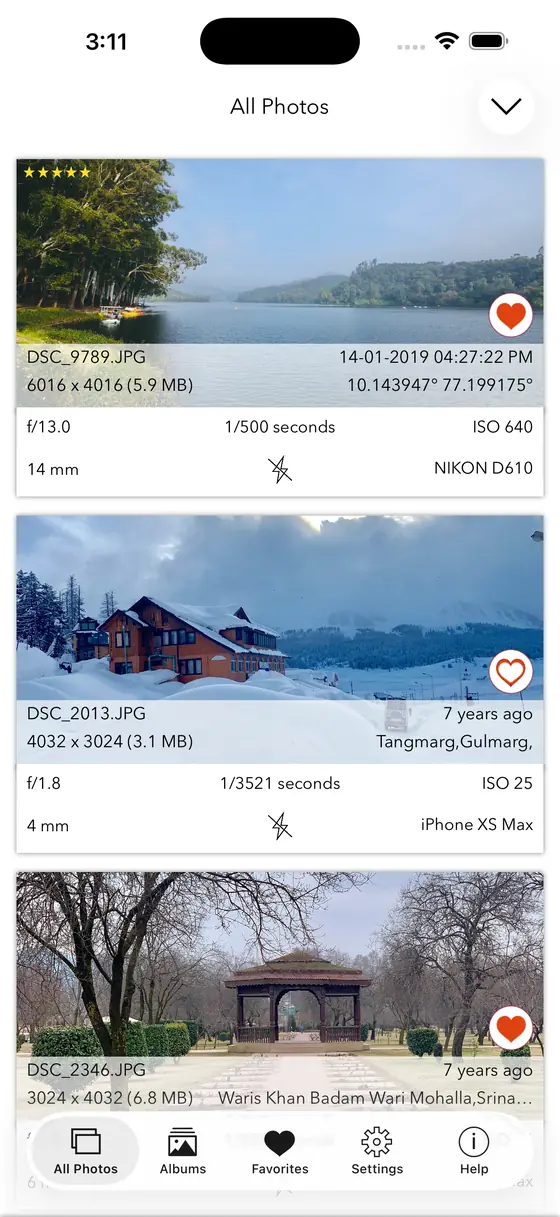
CardsEvery tag at a glance
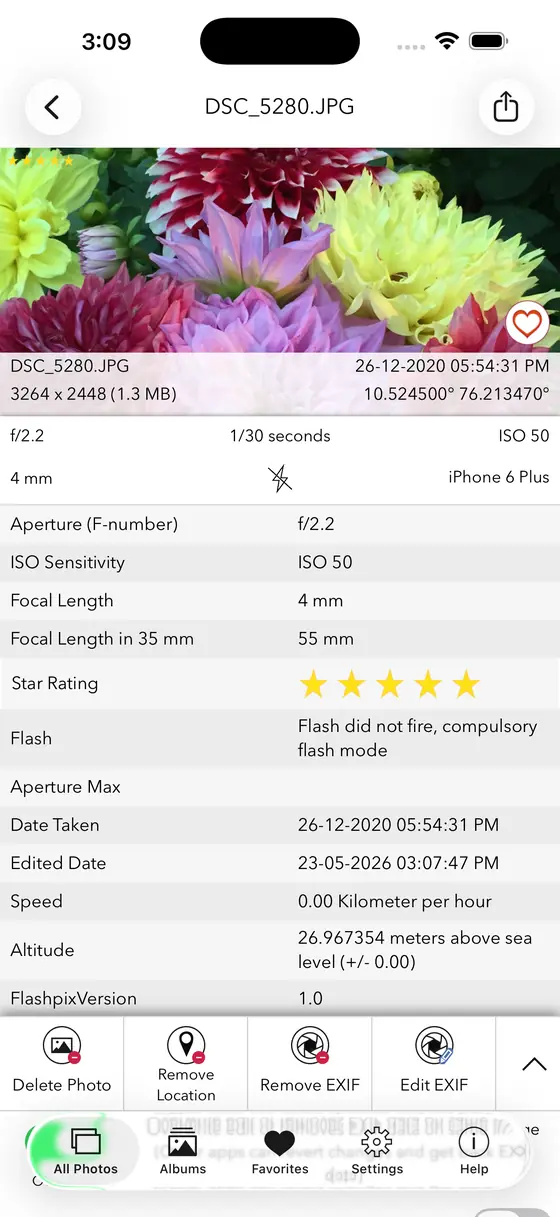
DetailFull readout for one photo
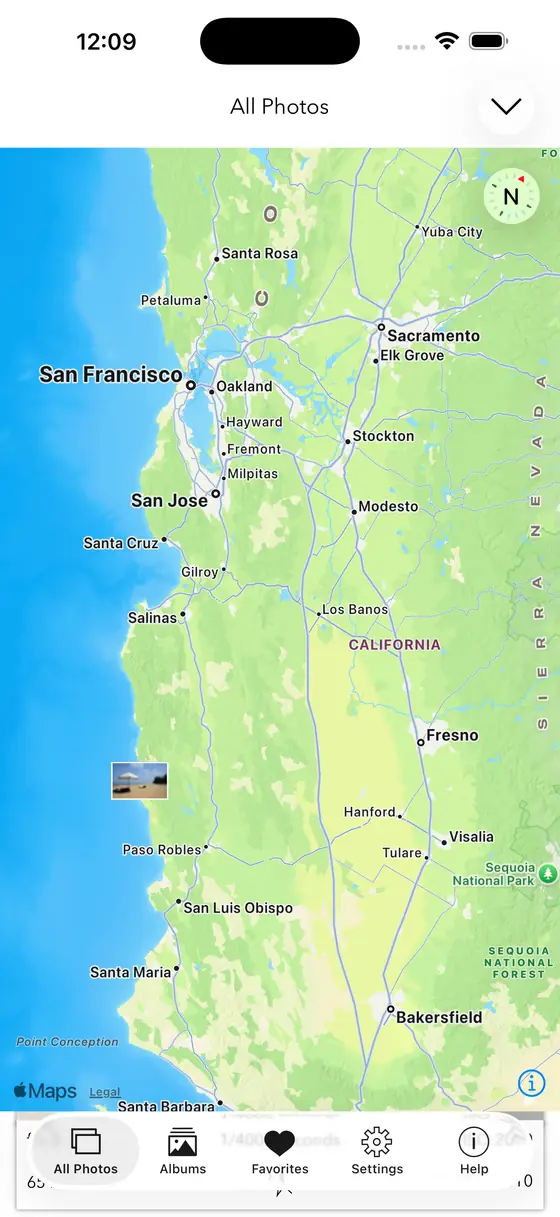
MapEvery geotagged shot
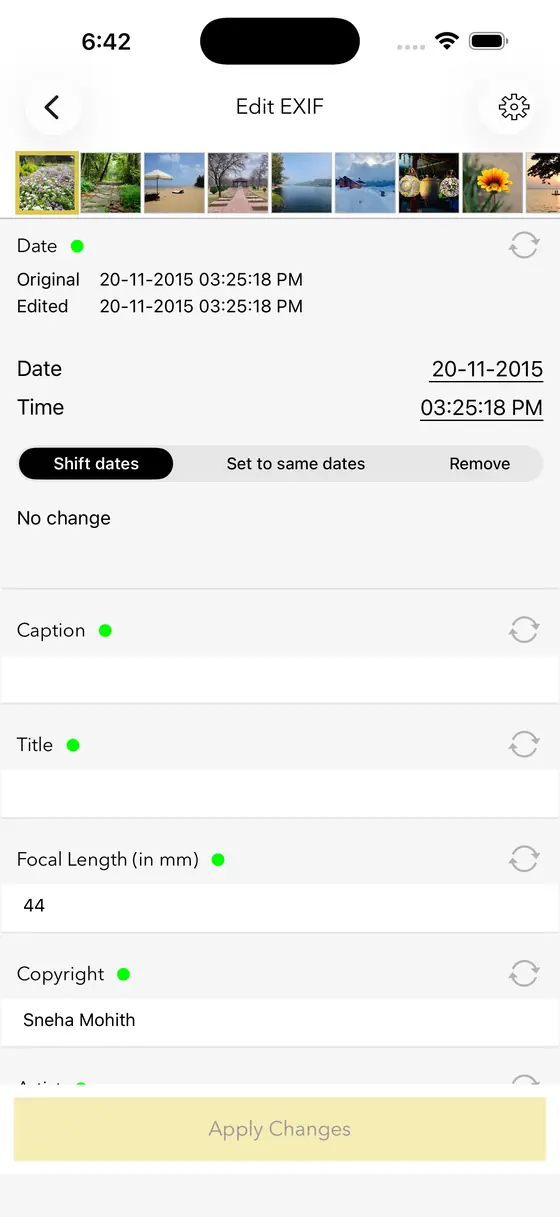
EditChange it or clear it
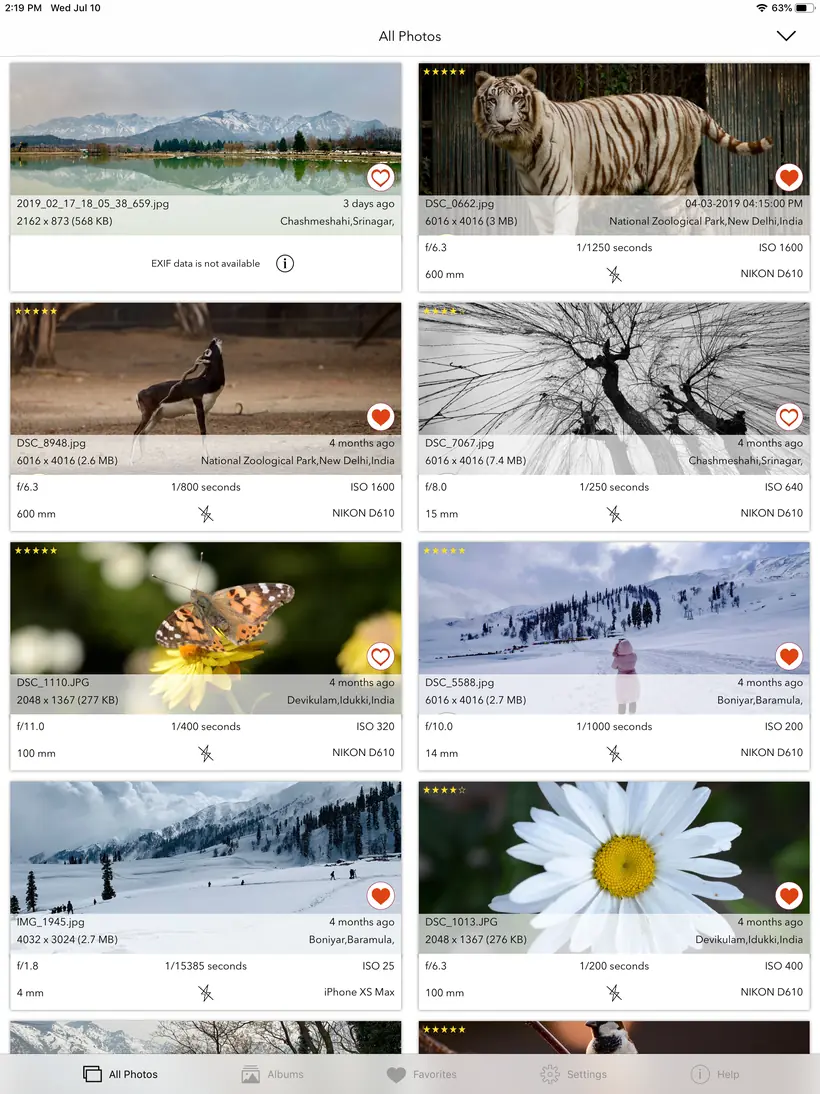
iPadThe same library, more of it


$2.99one-time
I’ve been scanning old family photos to preserve them digitally. Exif Viewer lets me quickly change the date, time and location data. You can even select and change metadata on multiple pics at the same time.
02 / PHOTOS SEARCH / DISCOVER TEXT WITHIN PHOTOS
The wifi password on the café wall. The receipt you photographed in March. The whiteboard from that meeting. Type a word, get the picture that contains it.
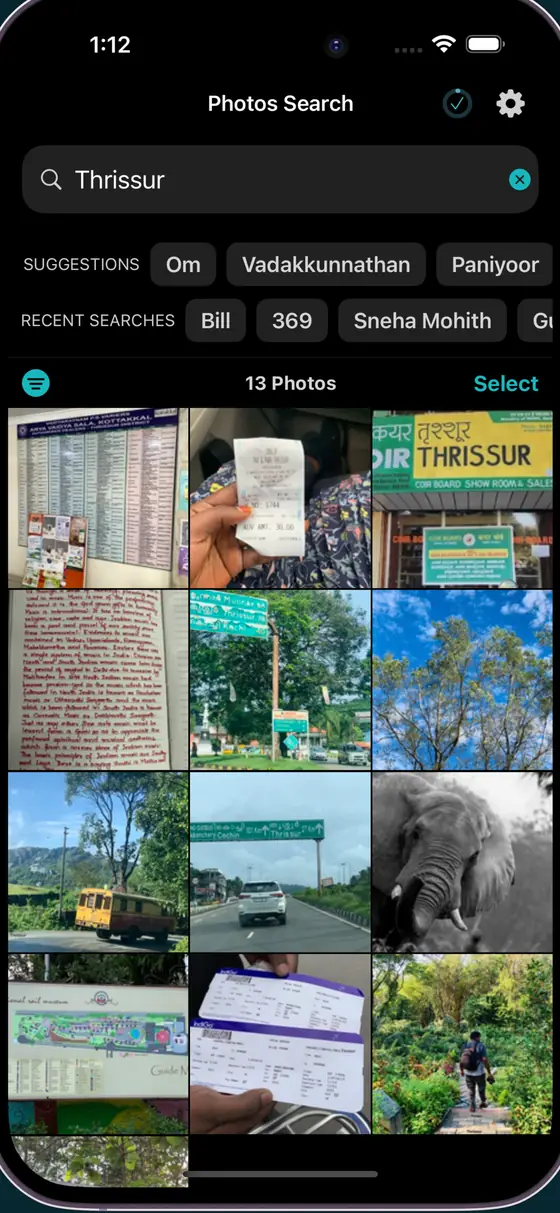
HomeSearch your whole library
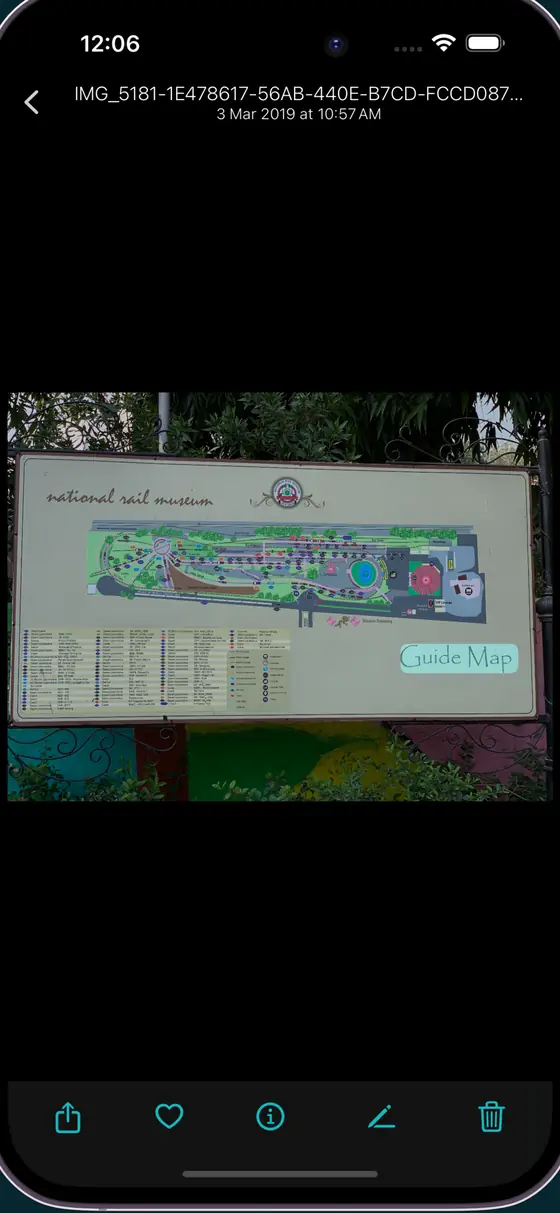
SignsFound on a road sign
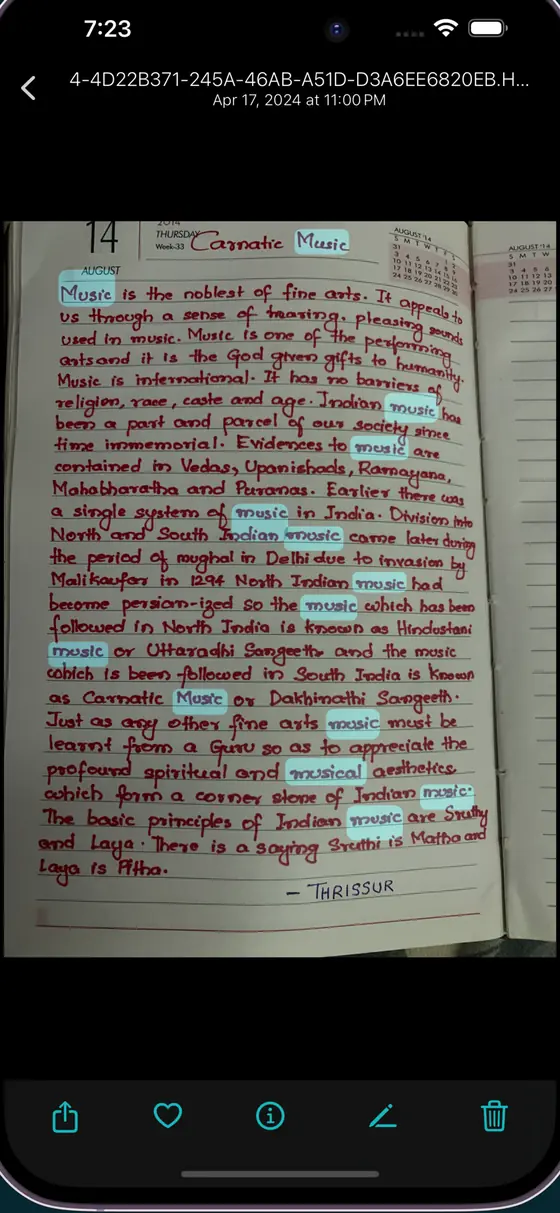
HandwritingEven handwritten notes
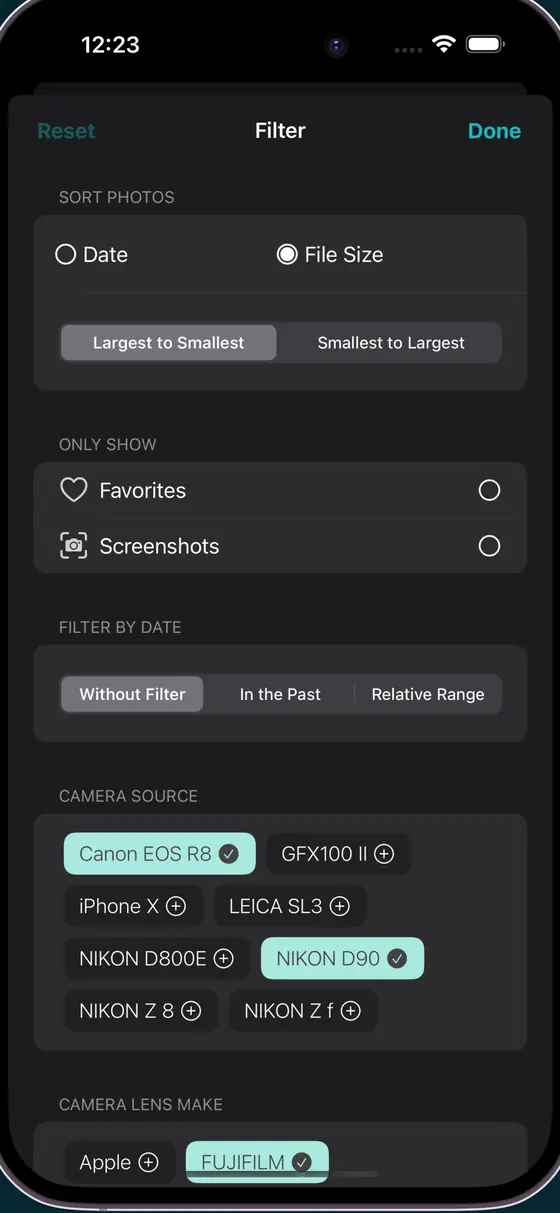
FiltersBy camera and lens
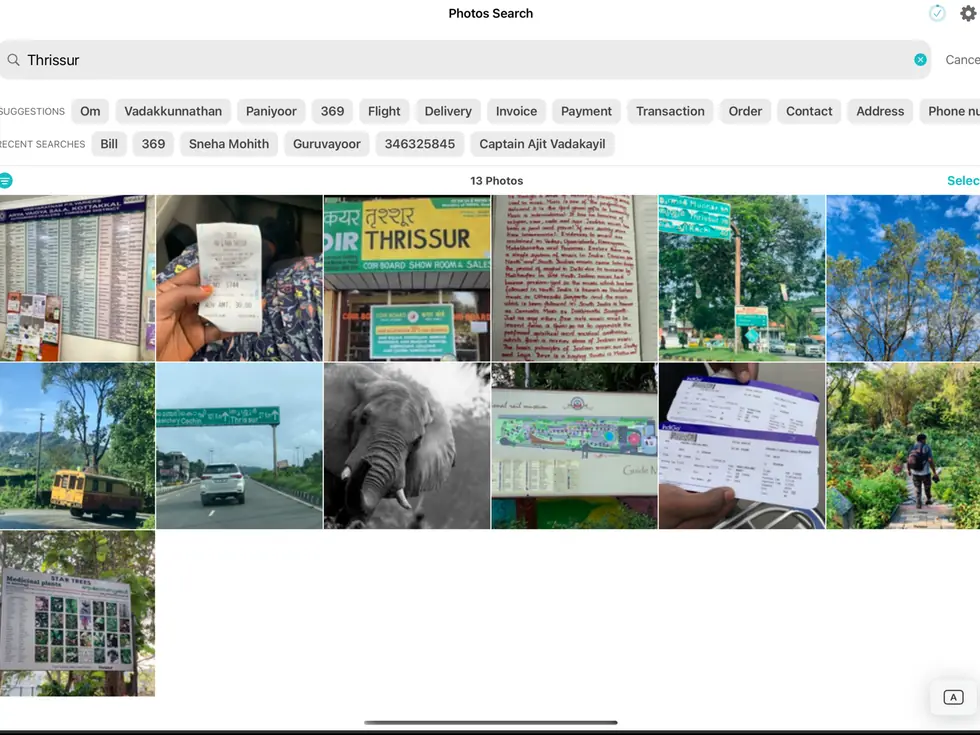
iPadSide by side on a bigger screen
03 / CLEANUP PHOTOS / DUPLICATE & STORAGE CLEANER
Smart Merge groups the near-identical shots, marks the best copy, and pre-selects the rest. You review, you confirm, and the storage comes back.
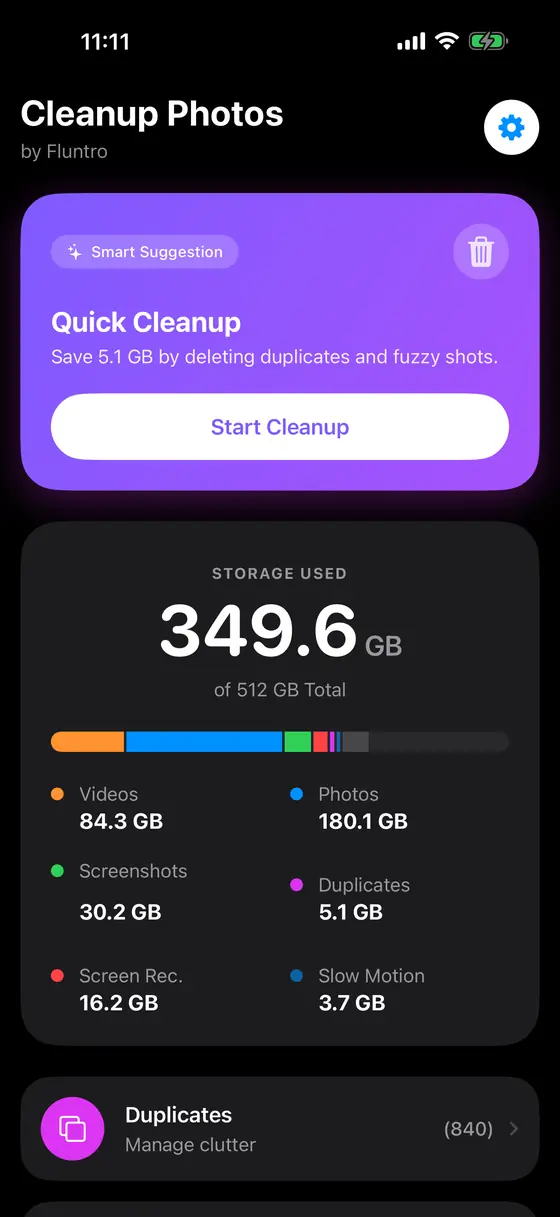
StorageSee what is using the space
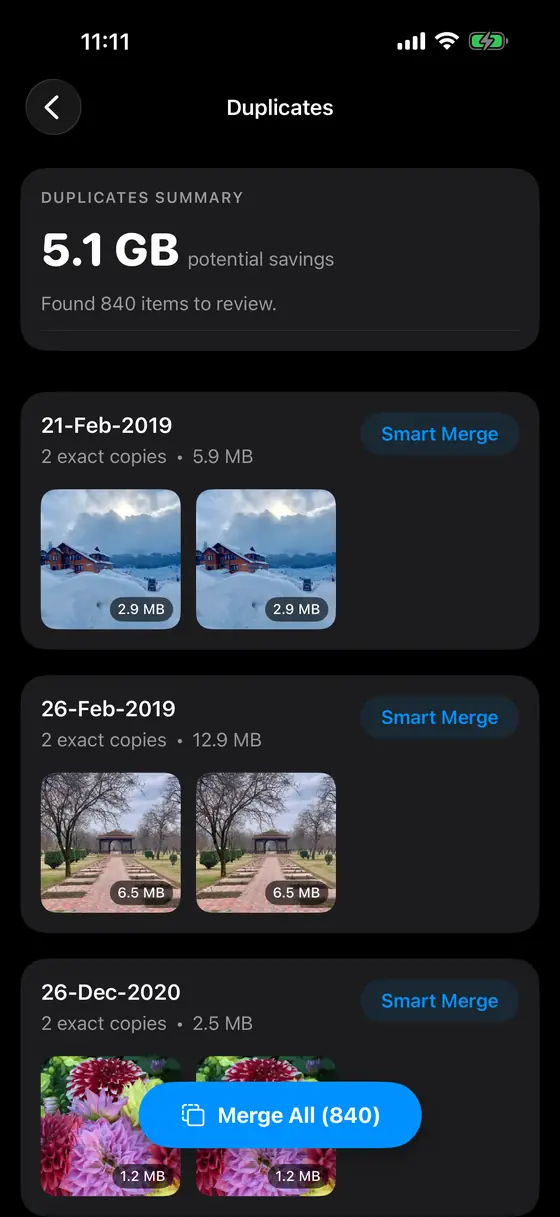
DuplicatesGrouped, best copy marked
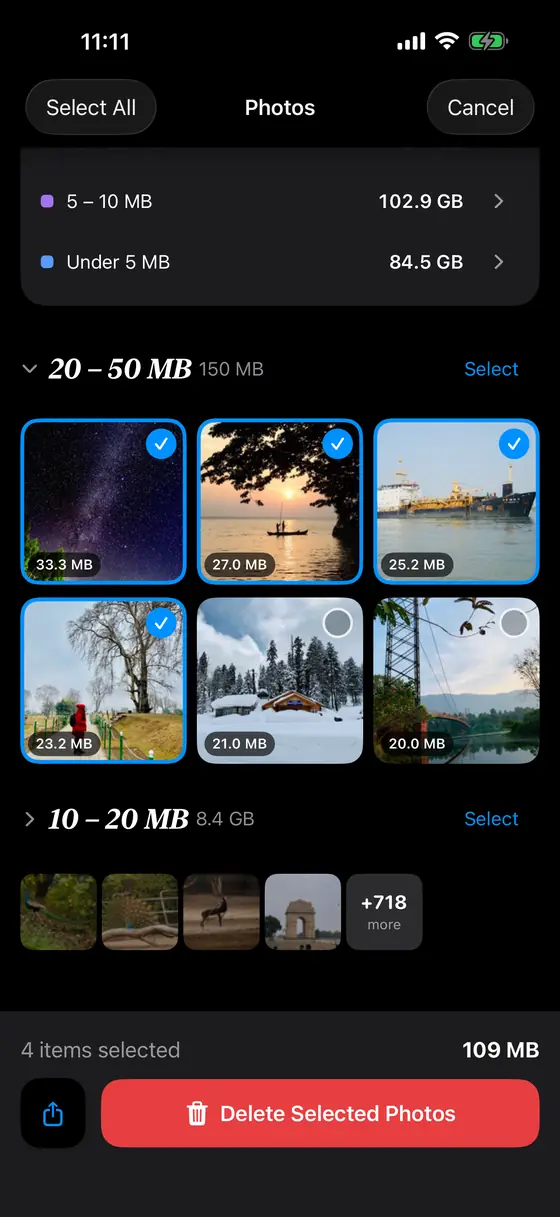
ReviewNothing goes without a check
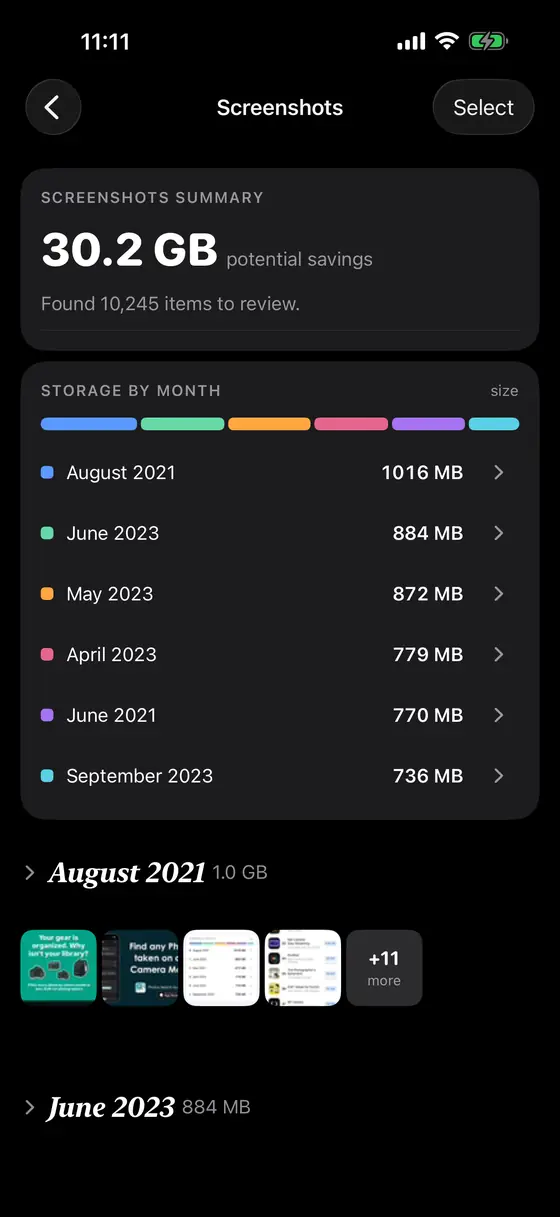
ScreenshotsCleared a month at a time
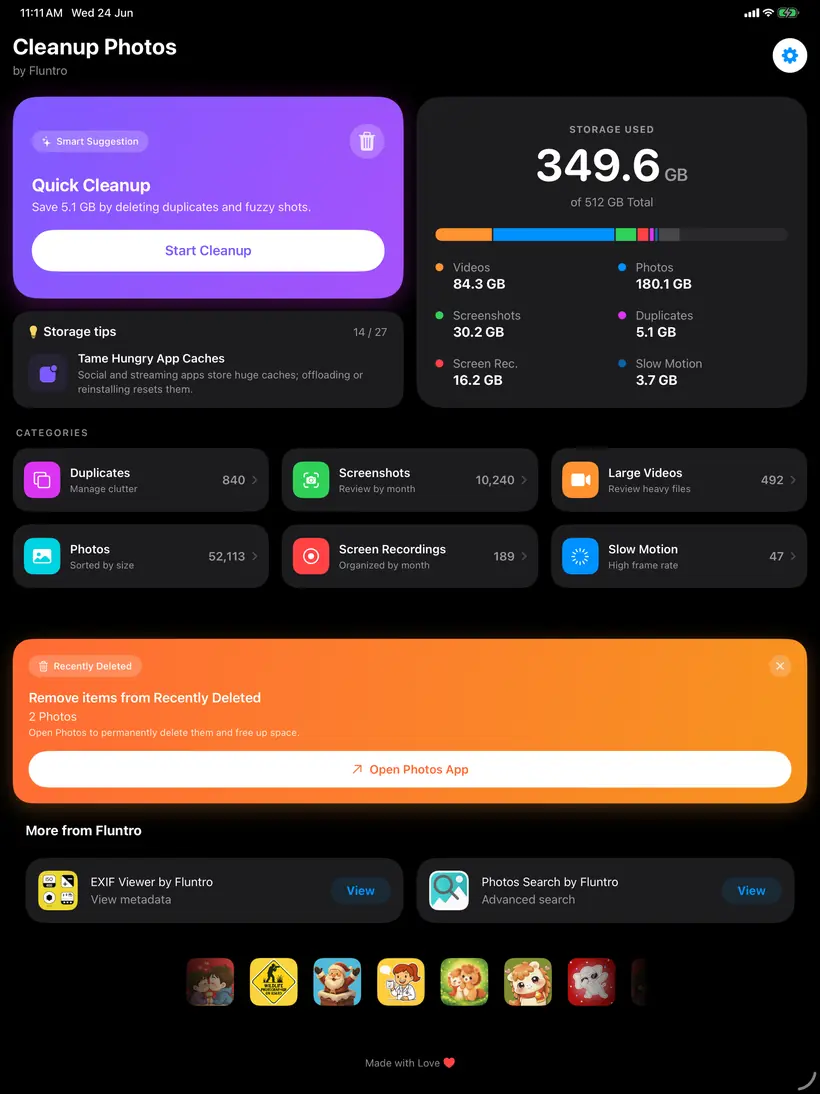
iPadSame sweep, more room
04 / SIDE BY SIDE
Three apps, three jobs. They overlap less than you might think — this is the quickest way to tell which one you actually want.
| Feature | 01EXIF ViewerView, Remove, Edit Metadata | 02Photos SearchDiscover text within Photos | 03Cleanup PhotosDuplicate & Storage Cleaner |
|---|---|---|---|
| What it does | Reads, edits and strips the metadata inside your photos | Searches your library by the text inside the pictures | Groups duplicates and screenshots so you can clear them |
| Best for | Photographers, and anyone sharing photos without a location tag | Anyone who screenshots receipts, notes and passwords | A full phone and a decade of burst shots |
| Platforms | iPhone · iPad | iPhone · iPad | iPhone · iPad |
| Requires | iOS / iPadOS 12+ | iOS / iPadOS 17+ | iOS / iPadOS 16+ |
| Price | $2.99one-time | $4.99one-time | $0.99one-time |
| Get | Get $2.99 | Get $4.99 | Get $0.99 |
05 / WHO MAKES THIS

Fluntro is a family-run business — created, owned and maintained by the two of us, husband and wife. We develop our apps with a strong focus on privacy.
That is the whole company. It is why every app runs on your device instead of a server we would have to pay for and you would have to trust — and why the reply to your support email comes from one of the two faces above.
[email protected]06 / QUESTIONS
No trial on the paid apps, so here is everything a careful buyer would want to know first.
No. All the apps process your photos on your device. There is no account, no server, and no analytics on your library. This website does not touch your photos either — it is a list of apps, not a tool. The full privacy policy says the same in longer form.
No. Each app is a single one-time purchase on the App Store. There is no renewal, no tier, no unlock. Buy it once and it stays yours, including future updates.
iPhone and iPad. They are universal apps, so one purchase covers both on the same Apple Account. There are no Mac or Apple Vision Pro versions today — if you were hoping for one, it is worth saying so at [email protected].
Yes — EXIF Viewer bulk-edits metadata across many photos in one pass, so you can retag or clear a whole shoot without opening each file. It handles images up to 80 MB.
Metadata is stored alongside the picture, not inside the pixels, so removing it does not change what the photo looks like. What you lose is the information about the photo — camera, lens, settings, date, and the GPS coordinates. That last one is usually the point.
The first index is the slow part, and on a large library it can take a while. It runs in the background on your device, so you can leave the app and come back. After that first pass, searches are quick and new photos are indexed as they arrive.
Every deletion needs your explicit confirmation — the app never removes anything on its own. Deleted photos go to the Recently Deleted album, where iOS holds them for 30 days before they are gone for good.
EXIF Viewer LITE is free and shows you how the metadata side works. The paid apps have no free trial, which is why the screenshots on this page are real and detailed — and why refunds through Apple are straightforward if an app is not what you expected.
Yes. Updates are included in the original purchase, on every platform the app supports.
Email [email protected] and a real person replies. Refunds are handled by Apple through reportaproblem.apple.com, which covers every App Store purchase.
07 / WHAT PEOPLE SAY
Exactly what I’ve been looking for.
I’ve been scanning old family photos to preserve them digitally. Exif Viewer lets me quickly change the date, time and location data. Your can even select and change metadata on multiple pics at the same time. The best part is that it overwrites existing metadata (it doesn’t just create a copy of the image with the new metadata you just changed — like other apps do). This is one of the best app purchases ever.
The best EXIF photo app ever!
I’ve tried quite some apps for editing exif photos metadata, and non came close to this! It can remove and EDIT photo location “geotag”, date, and nearly everything. It can edit multiple images at once! Also you can copy the location specifics from apple maps or google maps! And it has a dark mode! With an amazing user interface, very light and easy to use.
Indispensable power tool
This is truly an indispensable app for any photo enthusiasts. The ability to see the exif data was a great feature that drew me to this app but discovering the power of features like the bulk editing really blew me away. This enables me to do so much just from my phone. Truly an essential tool for the traveling photographer.
Highly configurable and useful
A real eye-opener into how much information is being collected by every photo we take. Most of the information I don’t want to see so I simply configure the app not to display it. Very useful when out cycling and photographing potholes in the road. I email the photos to the local Authority with the Coordinates.
Perfect app
I had a DSLR that unfortunately wasn’t able to record the location of the photos... luckily this app came to rescue so all my photos can have the location added properly. This saves my memory and is single handily the best feature of this app Just a suggestion on a feature: is it possible to implement slide to select multiple photos into the app when choosing many photos (similar to the photos app from iOS?)
Saved me from being scammed on craigslist buying a camera
About this program to look at shutter count. I was looking at the camera on craigslist the person was scamming me. I had them send me a picture supposedly from the camera they sent it from their iPhone. Busted I’m glad this program helped me. If it wasn’t for that I might’ve got cheated besides that this is a very nice program I would recommend it to anyone.
Awesome app!!
Surprised this exists on iOS, since file management is not that easy on iOS usually. This app allows me to change dates and times on my photos so that photos other people send me can be ordered correctly by the date the pic was actually taken rather than the date they sent me the picture. I’m picky like that haha
Awesome app.
I am an enthusiastic amateur photographer who has always been frustrated with not being able to view the Exif data from my photos on my iPad. I just downloaded this app, and now I have access to a wealth of information about each shot, and not just from my DSLR cameras, but even from iPhone pics. Wow! So far, it is working flawlessly. Well-worth the price.
Next best thing...
This app is great. Short of proper metadata/EXIF integration in the native photos app, this is the next best thing. The ability to access metadata via the share menu (without having to leave the Photos app) is fantastic. Very easy to add GPS data to photos too. Well worth the price.
能出添加文件夹功能吗
文件夹
Back to 5 stars
This developer listens to feedback and fixes issues with the app. This app does what SHOULD be a native feature in Photos: remove or adjust EXIF, and it does so flawlessly. And they’re not charging a subscription fee. Glad to support a developer like this and would contribute if they want to add a tip jar feature to the app.
Fix lỗi giúp admin ơi
Không mở được google map, chỉ xài được apple map. Nhờ admin fix lại dùm nhé, mình đã test iphone pro max, 13,14,15,17 điều không xài được google map.
Awesome quick and easy
I wanted to send a picture to someone but didn’t want to include the meta data. I downloaded this app and it was quick and easy. Two clicks and it was done. It even saved the finished work in its own newly created folder. I wish it had the option to save it as a copy without altering the original. (Maybe it does I just have not checked yet). Thanks for this quick and easy app appreciated
Professional App
This app has worked flawless to change photo meta data on the iPad with images stored in the Apple Photos app.
The best of its kind
There are not many apps that allow you to edit every single field that this one does. The action extension is an awesome touch, too.
nice app for EXIF
at first was not seeing images on Iphone 8 but working now working after phone restart allows removal or edit of EXIF data nice app
Just What I Needed
I needed to verify the shutter count on my DSLR. I know there is at least one web site that I could use that would look at an uploaded picture to find the information, but that shouldn’t be necessary. With all the EXIF viewers out there, I should have been able to use one to find the count directly. I had no luck finding one that worked until I came across this app. For a one-time cheap price, this app was able to give the count I needed and also a lot more EXIF information. In addition to including all EXIF data, the user interface is well done and easy to use. It’s very easy for me to highly recommend this app.
Sweet.
Really. Very nice ;)
Very functional; very helpful
This app works very well. It is well organized and flexible. I love the integration with the native Photos app. It is not the prettiest app but it has become invaluable to me. Thanks!
Fantastic app, really helpful.
I really like this app and use it more than I thought I would.
Hands down the best EXIF viewer on iOS
I have tried at least a dozen EXIF metadata viewers. This has the best UI with all the info right there on one page. Action share sheet extension is full fledged and displays everything without opening the app. Hands down the best EXIF viewer on iOS.
Great app, especially once purchased full copy
Does everything description claims, and more maybe.
Simply perfect
I use this app all the time to glean valuable insight into photos’ qualities and compare differences. Such an integral part of my process and just works perfectly!
好用
查看exif相当方便!
Works
It does exactly what it promises to do.
Worthwhile
Excellent. Easy to keep track of your photographs and the location where they were shot.
How do it know all that ?
It’s educational if you’ve been using auto sets. And reminds of course how you set it if you did so manually
Nice program!
I use this often to view my photographs to see what setting are working best. This works great!
Best Exif Viewer!
Excellent app! Has the quick action you can use when browsing the Photos app, or you can use this app directly to scroll through photos. Has the full range of data available and a great map that shows which direction you were looking when you took the picture. Can be exported into maps app. All in all a very solid tool for the iPhone photographer, whether just someone using social media or for a more serious photographer.
More Info & Better Layout
I’ve tried a few apps like this and find this app’s share sheet information to be better overall. Although, most apps like this will show you almost all of the same information. This app seems easier on the eyes. Thanks!
Does what it says and does it well
iOS has some shortcomings and EXIF Viewer overcomes those shortcomings.
Excellent app!
Amazing amount of data for each photo taken, and ability to remove location data as well. Highly recommended!
Great App
GG
Amazing
Wowow
Excellent. Worth every penny.
Worth every penny. Period.
Awesome app!!
Surprised this exists on iOS, since file management is not that easy on iOS usually. This app allows me to change dates and times on my photos so that photos other people send me can be ordered correctly by the date the pic was actually taken rather than the date they sent me the picture. I’m picky like that haha
Better than the others
I bought another developer’s EXIF editor and it was ok, but this one is the best. I really like the option to pin drop location data.
Privacy of your Photo Data
Best app for bulk removing EXIF data. Must have for any privacy conscience user.
i love this app
best metadata editor
Switches to Map Application Easily - That’s Nice
You have an easy to use way to either copy the latitude and longitude to your clipboard or just switch to Google or Apple Maps where the location is displayed. I use this as a notebook to log location of trail cameras and the direction the camera is trained.
Indispensable power tool
This is truly an indispensable app for any photo enthusiasts. The ability to see the exif data was a great feature that drew me to this app but discovering the power of features like the bulk editing really blew me away. This enables me to do so much just from my phone. Truly an essential tool for the traveling photographer.
A must
If you take pics with your iPhone, this app is a must. It's worth every penny and then some. This app provides so many useful features, I don't know if I could own an iPhone without it. Keep up the fantastic work!
Great!
Please add the ability to be able to edit video metadata. Thanks!
Good
Great!!
Fantastic app for Exif review and edits.
After trying multiple apps this is my goto app for what it does best. Edit dates or add locations to my imported pics. Thanks
Next best thing...
This app is great. Short of proper metadata/EXIF integration in the native photos app, this is the next best thing. The ability to access metadata via the share menu (without having to leave the Photos app) is fantastic. Very easy to add GPS data to photos too. Well worth the price.
Comprehensive and well-designed UI
This app is extremely well thought out, works very efficiently, and puts the most-used information right at the top before you even get into all the other data available. Even during swiping, you immediately get access to image name, dimensions and file size as well as date taken. This is all vital information for anyone who works with photos and videos on anything more than a click-and-send level. Beyond the EXIF interface, there are also additional management tools readily available. I’ve removed EXIF data and then imported into Photoshop/Lightroom/Bridge without issue. I’ve also chosen the share option to share without EXIF information and have confirmed that also works seamlessly. The overwrite function prevents a recipient from then recovering the EXIF data using another app. Overall a brilliantly executed app. Thank you to the developers for all your hard work.
Great to use
Very easy and fun to use.
Love it
Love it enough to bother to offer a (5-Star) review. Very robust. The ability to select what EXIF data to display is great. I don’t need to see ALL the fields. UI is well thought out and abilities to include data or not when sharing, add/delete tags, etc. makes this App stand out. So much good to say here.
Update
👍 good ,makes the app much better
Gotta Have It!
Must have for amateurs and pros alike; you don’t want to unwittingly share what you wouldn’t knowingly share! Works great, easy to use.
Saved me from being scammed on craigslist buying a camera
About this program to look at shutter count. I was looking at the camera on craigslist the person was scamming me. I had them send me a picture supposedly from the camera they sent it from their iPhone. Busted I’m glad this program helped me. If it wasn’t for that I might’ve got cheated besides that this is a very nice program I would recommend it to anyone.
Handicapped Vietnam veteran
It would be nice if the app had a way of allowing the user to set things like copyright, artist, etc as defaults that once the app is opened and a photo brought in, it would auto change those elements permanently.
Almost perfect.
App is by far the best available. Allows email of photos and metadata including location. Location data typically stripped from metadata sent to third parties. Not with this App.
Excellent App
I have the full version of the EXIF app on my iPhone and iPad. This app is excellent. Easy to use and is full of valuable information. Highly recommended.
App crashes
Hi. Since last app update, Exif Viewer version 5.6.1 crashes on videos on my iPhone 5 with iOS 10.3.3- Don’t have that problem with iPhone 6+, though. Txs in advance.
The original and best EXIF tool
Easy to delete GPS data from a photo. The integration to iOS is perfection. Developer support is great. I don’t personally know these developers but they rock and have made the best EXIF tool on iOS.
Awesome
Does everything it will says it will do and more. Easy to use, intuitive, well thought out, excellent program.
How can I change the file name?
I like this app I paid for this app I was exploring it but can’t change the file name Can you help me please!.
Like the app really much
This app is so easy to view the information of each photos from my Photos app from my phone ! Easy to navigate photo to photo And it recognize what Camera model I use correctly ! And one another good part is I can easily delete the Information of photos With single click ! Waiting for more better features to come 🙂👍
Helpful app!
I use this app all the time! It is helpful to me in identifying what camera app I used to shoot a pic, what file format the pic is in, what the size of the pic is, and other details that are helpful to me. Of course it also provides all the other Exif data as well which is very helpful too, but the things I mentioned first are the ones that I have found most useful (and was surprised how often I need that info!). GREAT app!
Exactly what I’ve been looking for.
I’ve been scanning old family photos to preserve them digitally. Exif Viewer lets me quickly change the date, time and location data. Your can even select and change metadata on multiple pics at the same time. The best part is that it overwrites existing metadata (it doesn’t just create a copy of the image with the new metadata you just changed — like other apps do). This is one of the best app purchases ever.
helps me track bees
I use this to track bee photo locations so I can have a complete record for each specimen
Great app
Great app
Action Extension
The action extension alone is worth the price. (Action extensions are the grey-scale icons you see after you tap the box-with-an-arrow-shooting-out-the-top/share/action icon while in Photos, Messages, or other apps.) I like the app for swiping through a group of photos and studying EXIF metadata, but what I really wanted was a way to see metadata that Photos doesn’t display, without leaving Photos. The extension does that. With the action extension, two taps (one on the share/action icon and one to choose View Exif) from within Photos and I can see exposure, file name, and so on, or two taps from within Mail or Messages and I can see on a map where that beautiful picture just sent to me was taken, assuming EXIF data is in the photo. And if I want to share a photo, another tap on the share/action icon, a tap to choose “Share with EXIF” or “Share without EXIF”, and the usual sharing options appear. Really sweet work flow. A tip if you’ve read this far - move the View Exif icon to be your second or third icon and manage and reorder the EXIF data tags to put the ones you use at the top.
Does all you could want.
Does all you could want. What else can I say. Perfect for examining my new Nikon D850 pictures on my iPad Pro 12.9”.
Review
Excellent, I love it.
Best EXIF remover app
Only improvement I would like is a new simpler icon.
Excelente!
Muy útil. Hace muy bien lo que promete: muestra todos los metadatos de las imágenes.
AWESOME!
Absolutely fundamental app for anyone that takes photography serious on their iPhone. A fantastic app, and made by fantastic people. I had the opportunity to communicate with the app's developers.. always ready to listen, help and improve the app. Positively 5 stars all-round:):):)
Latest Version works on iPad2 iOS 9.3.5
I wrote a bad review because of crashes, and the developers got in touch with me in a couple of hours. The latest version pushed is solid, and was available in less than 24hrs. Great app, does what it is supposed to. Useful, and good looking.
Awesome app! Dark mode!!
Five stars for this app and the update. I’ve been telling people (mostly young people) about the dangers of meta data embedded into images and have always recommended this app for removal if that data prior to posting images. Thanks for a great and extremely reliable program.
Best EXIF App out there
Yes, it’s true....this is the best EXIF available in the app store.
Security alert for those who post pictures
There is an old saying, it pays to advertise. Well everyone loves to take pictures of something new they got and may be worth money. You then post the picture online to share and it is wonderful, especially for crooks. Why? Because the gps tag on the picture show the location of where it is, to anyone and everyone. Would you go into a bad neighborhood and tell people there you have this valuable item that is easy to steal and resell and here is my address??? So I would recommend to use this to remove tags on valuable stuff before posting just to be safe.
recommended app
for photo lovers.. keep improving!
Should be first result
👍
Facebook post doesn't work
Amazing tech support! Just bought the app for the express purpose of posting photos without sharing my location. But by default the Post without Exif data feature did not post the photo; instead, it posted a link to the Exif Viewer app itself, in the App Store! I emailed the developer via the support link and got a prompt (almost immediate!) response! Inorder to get it working, Go to Settings Tab > General Settings > Share Settings > Turn off "Share EXIF Viewer App URL". I did this and it solved the issue! Now I can very easily and conveniently post photos without sharing my location! Highly recommend!
Great Support
Update 07/03/17: The devs already released an update for ARW files! Great support and glad I can use the app to its full potential I downloaded this app so I could keep track of my image file sizes as I have been using the iPad as my main workflow for importing and editing images. It does that well and I can watch out for filling up all the my space. I found out though that my Sony A7Rii raw files (.ARW) don't show Exif data. I contacted support about it and they emailed me back the next day saying they would look into it and let me know when an update has been released for it. Although they didn't give me a date it was nice that they will look into it. For their support and my main purpose of the app being successful I wanted to give them 5 stars!
Functional but not pretty
Very handy and competent app. Only wish is for a better UX.
Best of Class: full featured, intelligently designed
I tried many of the EXIF apps, and EXIF Viewer works the best. The developer put a lot of thought into this app. When I asked about the ability to edit metadata, the response came right away letting me know it is on the list of app improvements.
By goooood...
Good....
Everything is in view
This is a well done viewer for EXIF data and other data about the pictures. The data can be filtered and rearranged if you wish. It can remove the data but cannot edit it. I know it is just a viewer but I can't help thinking I would love to be able to add data as well. I would particularly like to add the artist, the user comments, and the caption. The image size in bytes and pixels are essential data that are difficult to find without a program like this.
Does exactly what it's supposed to.
Minimal fuss.
Does the job and does it well
I've tried a few EXIF viewer/remover apps. This one is my favorite. It's available in the action sheet and even has a widget. Nicely done.
Best EXIF viewer for iPad!
Thrilled with the performance and information this app provides! I have not tried to remove EXIF information - just to quickly see which camera and lens I used before uploading to forums and Flickr. Thank you, developers!
Nice app
Nice app
Great
Great app
This is awesome
Get this app
Great
Does exactly what it suppose to do.
Awesome app.
I am an enthusiastic amateur photographer who has always been frustrated with not being able to view the Exif data from my photos on my iPad. I just downloaded this app, and now I have access to a wealth of information about each shot, and not just from my DSLR cameras, but even from iPhone pics. Wow! So far, it is working flawlessly. Well-worth the price.
Great EXIF viewer with no ads
I'm typically skeptical of updates that may hide ads as an unannounced feature with no way to revert. This is not the case and so far the developer has been legit maintaining for free and with no ads it's excellent EXIF viewer. As improvements I suggest the possibility to use metric system (for altitude for example) and that it could eventually edit the geodata, ideally copying from another picture and in batch. Keep it up!
My New Go-To EXIF Viewer
As a professional photographer, I have now replaced my previous EXIF viewer of choice with this one: 1) This covers every detail of your photo imaginable, and further lets you customize what is shown and in what order. 2) This can be added to your extensions so you can view your EXIF information right within iPhone's native photo viewing program. There are a few hiccups that aren't critical: for one photo the Exposure Time read, "0.066667 (1/2 second)" when those are two different figures (the fraction was accurate); and when you use Camera+ to shoot a photo it claims your iPhone 7 Plus is actually an "iPhone 9,4." Still, I recommend this app without reservation.
Outstanding
All the EXIF data I need in an extremely accessible format. Was using a different app, but this beats it for usability hands down!
This is bessssst app in the world
This app was in my dream till i found it, thank a lot developers
This, this is the exif app you're looking for.
Excellent!!! 1)Has info (you decide which info it shows) on thumbnail view. 2)Also while you are using Apples own photo app there is a handy widget right there in 'share page' so you can see the photo's info. These two features are, (as far as I've seen) exclusive to this app.
Excellent App
I think that you have to add Shutter conunt
best exif app ever
This is a killer app for quickly getting exif data off of the images in your camera roll. Highly recommended.
A must have for anyone!!!
Simply the BEST at what it does! Very easy and intuitive to use! Feature packed to the max!
Best Exif app yet!
Thanks for discount!
Great and useful for managing photos by different apps
I use my iPhone almost exclusively for photography. I also use a variety of camera apps and editing apps. Being able to see on my phone which photos were taken with which apps is very useful for figuring out which ones give me the best quality. Be sure to go into settings and arrange the Exif data in the order that is most useful and you can hide the entries you don't need. I am glad I discovered this app.
Wonderful Application!
This is a terrific app! It fills in an enormous gap in the stock Photos app's features. Finally, I can see each photo's filename and the tons of data items in its exif data. It has many customization features, and the developer is amazingly responsive to questions and even to reasonable suggestions for change. What's not to like? BTW, the gps location features work fine for me. 5 star!
Performs as advertised
This app provides an impressive list of the image file data.
exif viewer
thank you for this useful app. it is very functional.
Thanks for Christmas gift.
A good app. I am satisfied.
Works great
The app works great. The ability to copy EXIF data to the clipboard is just what I want. It shows a lot of data from my Sony camera. I recommend this.
This app is Amazing !!!
Full exif view with simple clean layout to view all information about your photos like timestamp iso shutter etc.etc. Very nice 😊
My new favorite
I've tried many Exif viewers and have liked the layout and the ability to customize this app the best. Now that the location bug has been fixed when used as an extension and gps speed has been added, this has become my go to exif viewer. I am very impressed with how responsive the developer is to suggestions and am confident that this app will continue to get even better in the future. (Version 2.05)
Best Exif app
Tried them all, this one is the best and easiest to use and great customer service.
很好用了,提个建议
能不能做一个功能,选择一张照片的,然后把这张照片的全部 exif 信息都复制到另一张图片上,或者可以批量编辑一批图片的exif
适配一下新系统吧
在iPhone 15 Pro Max上显示不完整
功能建议
请问能否支持批量导出指定exif内容呢?比如批量导出照片的拍摄地理位置、光圈等?
诈尸了
很好用的软件,居然更新了
科技创新、简单实用
使用中
希望能够更新解决iPad Pro的掉帧问题 查看照片时太卡了
Parden:希望能够更新解决iPad Pro的掉帧问题 查看照片时太卡了
很强大的软件
限免时候入的,确实值得五星好评! 主要看到照片的拍摄位置,会回想去那时候快乐的经历。 ps:希望界面能好看些
The best!
最好的照片Exif管理应用,作为图像浏览器还可以无限放大图像查看,五星!
照片的大小至少缩减一半以上
编辑exif信息(如添加位置、修改拍摄时间等)后,照片的大小至少缩减一半以上,原来22M的照片,添加位置和修改时间后,大小只有9M不到,但是分辨率没看出区别,清晰度也没感觉到变化,是什么原因呢?
画质
为啥会压缩画质呢?本来20多MB,添加位置后只剩下4MB了,而且很多次这样 外加iPad没有底部的选项 界面卡顿不美观
一个疑问
请问下iphone照片里上滑添加的说明,是否存在exif里了?是否可以在第三方软件里查看呢?
软件很好,细节有待优化
设计简单易用,界面友好,试用很多以后决定买这个。下面说一下漏洞和可以优化的细节细节。漏洞:ipad版本无法编辑12分钟的短视频信息,否则会长时间无响应必须重启App,用了这么长时间只有这一个漏洞。优化细节,右上角的下拉菜单反应太慢,视图选择图标太大了居然覆盖了1/3的屏幕,选择图片滑动时不够平滑。目前就这些,之后还会更新评论
that is good
but something still could improve,such I look through my photos,swipe my screen,fps will decrease badly
建议增加编辑和添加GPS位置信息功能
希望能为缺失GPS信息的图片手动编辑添加。
良心软件,功能完善
并不贵的价格带来了全部的功能体验,不仅能查看手机拍的照片,而且单反相机传送照片到iPhone和iPad后也能查看到所有照片信息,毫无疑问这正是我想要的软件。
希望解决GPS信息的位置偏移问题!
其他的功能都非常好!但上述的问题希望能解决!从我目前的使用情况来看,我所在地区的位置的偏移的距离和方向似乎是确定的,是否可以修复呢?
希望能优化照片预览功能
修改exif功能已经很强大了,但是照片预览功能有待优化。因为照片加载速度慢,如果想找个一两年前的照片,需要不断上滑好几分钟。希望能够增加根据日期搜索的功能,让照片预览功能方便 快捷 顺滑
挺好用的
这个和另一个多了lite的有什么不同吗
17年2月17日曾限免
时隔多年20/4/12限免「不知中途是否限免过」,又出现在我的眼前,很好用,补个好评~
终于可以看到文件名了
不错,信息详细,界面整洁
非常方便
可以在手机上看 exif 信息,尤其是相机传图到手机上后有这个软件太方便了!
更方便,功能很全
这个软件无论是照片和视频,都显示的非常得好。他的信息非常全面。交互体验也不错
能否在现有基础上增加通过EXIF信息搜索?这样可以作为相册管理!
能否在现有基础上增加通过EXIF信息搜索?这样可以作为相册管理!
值得五星的软件
很方便的一款软件,有助于消除照片中的隐私数据
五星好评!
请问可以复制EXIF信息,可以将复制的信息全部粘贴并覆盖到另一张照片吗? 如果没有,是否可添加这个功能? 谢谢!以后继续支持。
欺骗消费
无法看到gps信息,除非是隔空投放。18元开的功能毫无建树。差评,退款。
良心软件
希望早日纠偏火星地图定位 用户评论栏只能保存一个字,望修复。
修改exif 元数据后无法保存
修改exif元数据后,保存时出错,无法保存。
非常棒的软件!
很好用!
iPadOS 13.1.3闪退
在照片app里点共享用本app看exif时闪退。
物有所值
很好,更方便,让我找不到任何退款的理由
很棒!
这个 App 支持 Widget、iMessage 信息 app 以及共享表单,值得一用! 2019 年 10 月 10 日
非常好用,但是可否加入搜索功能
app已经把每张照片/图片的真实文件名给显示出来了,IMG_xxxx.jpg/png/hei这样的 导入电脑上看,都是真实文件名。 那么有没有可能加入一个搜索功能,直接搜索对应的IMG_xxxx的4位数字,从直接跳转该照片/图片呢?
中国大陆境内位置不能正确显示和标注
标注的位置,在ipad内置照片中偏移较大
编辑Exif的问题
是否能在编辑信息里添加焦距信息?因为使用的是手动镜头为了方便以后查看照片。
好用!
之前以为这软件不能读取exif信息,结果沟通了下开发者,原来是照片的问题。
好用
付费版使用中。
很棒的应用
用了好多年了,一直在更新和适配,真的很良心的一款好软件,参数信息显示很详细很全面,希望作者继续努力😊加油
添加的位置信息存在定位偏移
因为一些特殊原因中国的GPS定位是有偏移的,这样会导致在软件中添加的位置信息在iOS相册中查看不准确,不知是否可以做出修改,谢谢。 (The following is translated by google, may not be accurate)Because of some special reasons, China's GPS positioning is offset, which will cause the location information added in the software to be inaccurately viewed in the iOS album. I wonder if it can be modified. Thank you.
非常非常好用
可以查看图片大小,各种信息,iPhone必备软件啊!大赞👍🏻👍🏻👍🏻
软件太好了,非常棒
希望增加一个这样的功能,相册中通过分享打开的照片exif中,增加在exif view中打开的选项
非常不错。
可以编辑,希望增加在图库中查看时,可以编辑。
App 很好用
相册分类明确,易于查找相关信息,Pic信息显示准确!
反馈了那么久的App extension终于更新了
五星好评。
非常有用!
但是查看视频详情的时候需要加载一下,希望可以优化。
非常棒的exif软件!
希望持续更新下去,感谢开发者!
没有广告!好评!
就是不知道如何批量
谢谢
谢谢你们认真的在做这款软件
五星好评
简单实用
似乎这类型的软件都有一个通病呀
就是修改GPS坐标系之后,在照片地图里面看到了永远都是偏离的
好东西
用苹果这么多年了,这才发现有这么强大的东西,一直困或于照片信息怎么读出来,这下好了,全都有,而且还可以更改
更新后闪退
非常棒的软件,但这次更新后闪退不能用了,系统版本iOS9.1,希望作者尽快修复,谢谢。
位置偏移
很不错的软件,但是由于中国地区坐标系的问题,位置会有偏差,希望开发者能重视这个问题解决一下,感谢
很赞的软件
可以在手机上完美查看相机拍摄的照片参数
不错的软件
好用
iOS必备软件
这个原本是系统必有的功能,Android自带
富士用户前来好评!
居然支持了Fujifilm的胶片模拟,大赞!幸苦了开发者!
非常好用
这是一款非常实用的软件,逼格很高!
功能很强大
就是在改定位的时候 能不能实现直接在地图点选啊 貌似现在只能搜索
我爱
♡
棒棒的
可不咋滴
很好用,但有些不足
虽然支持中文,但是翻译上感觉有点机器翻译,并不符合中文习惯,而且部分说明视频是YouTube链接的。既然贵公司如果有在中国市场发展壮大的意图,我觉得可以好好请人翻译一下软件语言文本,并且说明视频换成在中国大陆能浏览的网站。
不错的app 早就想删位置信息了
想问问开发者 这个app和另一个的不同点在哪?
非常好
如题
花钱购买后,经常有闪退的时候。
购买该软件后,在相册中打开照片,用该软件查看详细信息,经常有闪退或打不开照片。
不错
编辑Exift里的位置是否可以直接输入GPS的经纬度?
更新不错
社交软件风靡,有了这个软件,发图安全很多。
希望加入批量添加相片参数水印的功能!!
希望加入批量添加相片参数水印的功能!!
很好用
如题
挺好
很好用很详细
很好
不错
好好好
很好很强大很喜欢
What’s the difference with LITE
What’s the difference between EXIF Viewer and EXIF Viewer LITE?
很好
很喜欢
相當不錯的軟件
如題,真心覺得好用
Why I cannot delete Exif?
Hello dear developer, I don’t know why when I wanna delete the Exif, it failed with Cocoa error 1, is there any method to solve this problem? Thank you, the software is really beautiful and useful ~
难得的精品应用
苹果该做的没做好,这个应用做的非常好,尤其对经常用相机拍照的人。
很棒啊,能不能直接照片应用使用啊
如题,能不能告诉一下扩展功能
很有特色的app
简单实用 很好的软件 很喜欢
感谢
支持 真是需要这个软件 谢谢
软件的url我想知道
软件很好,想作为快捷启动,但是找不到url,
希望继续美化UI
我真的太爱这个APP了!当初为了在iOS上寻找一个可以查看EXIT的APP,试了很多APP。自从发现这一款,我就决定用这一款APP,把其他的全卸载掉。最近新版本加入了暗黑主题,又正好和我胃口,我觉得暗黑主题特别漂亮。只是,UI略杂乱,虽然不影响使用,就是看起来离完美有一点点距离。希望开发团队美化UI,简洁又不失专业。
中国大陆的照片坐标不准
普通GPS定位出来的数值都是基于WSG-84坐标系标准,这是世界通用的坐标系。 中国大陆地图的标准坐标系是GCJ-02,高德等地图用的都是此坐标系。GCJ-02和WSG-84之间的坐标系转换算法是保密的。所以和GPS本身没有太大的关系。通过手机GPS芯片拿到的坐标去标记在国内地图上,展示的位置肯定与你的实际位置是有上百米(有的地方会上千米)的偏移的。
怎么才可以看到社交网络上保存下来的照片信息呢?
怎么才可以看到社交网络上保存下来的照片信息呢
小巧好用,信息全面
此软件信息全面,小巧易用。
不错
我觉得OK
不错的软件
原来还真不知道,照片上还会包含着这些信息在上面,暂时还不知道怎么用,仅仅只是查看一下,照片上有些信息缺失,不知道能不能进行批量编辑修改信息,并实现自动归类的功能?
耶和华你神
是因为自己不想
居然每一条评论都有回复??
哈哈
还不错,小bug 还是有的!
照片下面的基本信息里,闪光模式和相机型号在一行里,文字重叠在一起,希望能改进! 另外希望增加相册顺序调整的功能,让用户自定义相册的显示顺序! 最后加一句,中文翻译简直了,能认真点不?
非常好的一款软件
很良心的一款软件,可以更改/删除照片信息,必须支持一下!!!👍👍👍
好工具
赞赞赞!
什么破玩意儿,钱花了,下不下来,骗人!
什么破玩意儿,钱花了,下不下来,骗人!什么破玩意儿,钱花了,下不下来,骗人!什么破玩意儿,钱花了,下不下来,骗人!什么破玩意儿,钱花了,下不下来,骗人!什么破玩意儿,钱花了,下不下来,骗人!什么破玩意儿,钱花了,下不下来,骗人!什么破玩意儿,钱花了,下不下来,骗人!什么破玩意儿,钱花了,下不下来,骗人!什么破玩意儿,钱花了,下不下来,骗人!什么破玩意儿,钱花了,下不下来,骗人!什么破玩意儿,钱花了,下不下来,骗人!什么破玩意儿,钱花了,下不下来,骗人!
嗯
藏族自治州🀄️
看了一下非常好
跟实际没有区别
软件很强大👍🏻
目前iOS上找到的最好的软件了!功能很强大!和iOS相册结合得很好,很方便!对于一个摄影爱好者和参数党而言没有照片信息简直是如鲠在喉!感谢开发者!另外,全屏显示百分比能不能设置成双击时以图片原始像素为基准百分百显示而不是以当前屏幕显示为基准啊(比如我想以图片百分百像素的模式查看图片,而不管屏幕显示的大小)?谢谢!
Exif Viewer by Fluntro
Exif Viewer by Fluntro lite有什么区别
有的显示不出来
有的照片拍摄内容之类显示不出来。我用定焦拍摄的,直接传手机里的,按照提示却是网络复制下来的。没有拍摄的详细。
十分好用
十分好用
很好 谢谢开发者
应该是每个玩摄影的人的必备app之一吧 希望越做越好
不错,很方便
直接在图库里查看exif,很好用
神器
么么么哒
知乎观光
^_^
楼上居然有开发人员的回复!
哈
挺好的
嗯。
看起来很高端噢
感觉很不错。支持
非常简洁易用
业界良心!
Exit Viewer 软件
非常实用的一个软件,对拍照有极大的帮助点个赞
更新界面以后比原来更丑了
我想回滚啊 ------以上是原评论------ 作者居然回复我了!那我就认真写一点吧(•̀ω•́)✧ 其实这个APP真的好用啊,参数非常齐全! 其实我只是觉得改版以后UI没原来那么美观,操作方面倒没觉得有什么不舒服的地方。 建议加入自定义UI或者自定义底端显示的板块的功能,以满足不同用户的不同用法的需要。 而且当前版本的那个“help”还单独分成一个主要板块,跟其它主要板块同级,我觉得对大部分用户应该是多余的,又影响了界面的简洁性,建议加入到setting菜单末端,并设计成在第一次打开APP的时候弹出。 而且我认为help在中文语言下的“帮帮我”看起来很别扭,按照绝大部分产品的习惯我还是建议改成“帮助”或者其它表达方法。
谢谢有这么好的软件
谢谢作者
很不错了已经
图片信息显示非常多,甚至连手机向哪个方向拍都能看出来
ok
很好的一款产生。
信息全面
如题
Edit Exif ?
能不能编辑exif
非常实用的软件
用来查看照片信息很实用,信息很全,还能抹除GPS 信息。
不错,很好的app
要是能显示live photo的详细信息就更完美了。界面的美观度也有提升空间。
好用到没朋友
限免时下的,的确很全面的wxif信息,连拍摄时手机是朝着哪个方向都能在地图信息里显示出来
很好的图片及视频信息查看工具。
很好的图片及视频信息查看工具。强烈推荐,谁用谁知道!
好用
一如既往的好
很方便
在照片页面通过分享功能就可以查看图片信息。
非常好用👍
查看图片详细信息非常方便
Must have for Photographers
Very informative, This is what I was looking for a very long time. Thank you so much 😁
棒棒棒
必须五星好评
限免下载
好东西,显示信息完备
炒鸡棒~
限免时候得到的,好用没广告
用起来很棒哦
限免期间下载的!可以读取照片的详细信息,装X利器
觉得好用就下了 可是我这边没有显示要收费啊??啥情况自动扣了??
我本来是来看下价格先的 结果没显示价格 我就直接下载了 回扣费么
很棒的照片信息查询工具
希望能改进下翻译,机翻就算了,还只翻译了一半...
挺好用,还可以改进
一个不错的Exif的工具,中文翻译有点怪怪的,
6plus runs well
好使
快门速度问题
当快门大于1秒后,显示1/0秒。 明明关闭GPS,还是会显示Map Location
同类app中界面设计最好,exif信息最全
outstanding.But I think if there is no exif data for a photo,you should not show its exif by the default value when you slide that photo to the left ,isn't it?Because it really makes me confused.
Behoben Exif Viewer Crash beim scrollen Stand August 2026
Behoben :App stürzt beim scrollen/betrachten der Bilder nach unten ab. Unter iPhone und iPad. Auch nach Update Juni 2026 weiterhin Absturz. Stand August 2026, der Fehler ist immer noch nicht behoben. Endlich gepatched….
one of the best - if not _the_ best EXIF viewer
A remarkable little app that I've been using for over a decade - time truly flies! It stands out as one of the hidden gems of the App Store. Packed with features and consistently updated, the developer honors the lifetime license commitment he made. This is undoubtedly the "oldest" app on my phone that I still rely on, and I would gladly pay the developer again for it. It's an exceptional service. Thank you, Mohith! Wishing you all the best!
Really good first impression!
... already did bundle app completion right now!
wertvolle Ergänzung
zu Apple Fotos
Supee
Toll
Of all the EXIF apps
I used from the AppStore, this is the best one.
übersichtlich, viele Möglichkeiten
Sehr brauchbare App, um die Metadaten zu sichten oder zu bearbeiten. Abhängig vom Anwendungsfall vielleicht die richtige EXIF App. Vorab kann man sich ja die Hilfe-Videos ansehen
Ausbaufähiger Workflow
For my intended „publication“ use case: Better usability would lead to an additional image without EXIF, watermark identifying the copy from the original and resized image in one standardized step.
Das beste: kein Abo!
Die App ist sehr gelungen und tut, wozu sie erdacht wurde. Zwei, drei Dinge sind mir aufgefallen: 1) schade, daß RAWs nicht gelesen werden 2) Videos werden wohl auch nicht unterstützt 3) ääh… nö, nix mehr sonst 🤣
Sensationell...
...macht genau, was sie soll und das perfekt. Für jeden Fotografen ein Muss.
Beste exif App
Und das noch für Nix Hammer gut
Sehr gute App
Diese App bietet vieles, was die Standard Fotogallerie von Apple nicht kann, so zum Beispiel das einzigen der Dateigröße von Fotos und Videos (wofür ich die App am meisten Nutze)
Super app
Best app um sich die BILD-Daten anzuschauen oder zu verändern. Bietet sehr viele Infos über die Bilderdaten.
Lange gesucht...
...und gefunden. Superapp, vielen Dank.
Toll!
Macht was sie soll! Tolle App!😎👍
Toller EXIF Viewer
Sehr schöner und schneller EXIF Viewer mit vielen Funktionen und Einstellungen. Die Bearbeitung gelingt durch Batch-Verarbeitung sehr bequem und effizient. Er ist sehr nützlich im Alltag und man kann auch mal schnell EXIF Daten entfernen. Aber bei der Einführung beim 1. Start der App würde ich mir noch zusätzlich im unteren Bereich eine eine kleine Beschreibung bzw. Zusammenfassung wünschen was gerade im Video gezeigt wird.
Klasse
Tut was es soll !
Meine erste Wahl, …
wenn ich Informationen zu einem Foto ansehen oder verändern möchte die das iPhone mit von Haus aus nicht bietet.
S. U. P. E. R. 👍👍👍
Ganz hervorragende Exif-App!!! Sehr coole Darstellungsoptionen, individualisierbar, zeigt u.a. sogar die Anzahl der Verschlussauslösung an. Standort oder EXIF-Daten löschen oder EXIF-Daten bearbeiten. Für iPhone und iPad, und es gibt eine LiteVersion - vorbildlich!
Hervorragend
Großes Lob an die Entwickler. Noch größeres Lob, das es eine Kaufversion (und kein Abo) ist. Endlich eine App mit der Fotos extrem einzoomen kann und die mit alle wichtigen Infos anzeigt. Die App könnte glatt die Standard-App ablösen. Kleine Wünsche wären da noch: - Albumansicht im Listenmodus (Links Album und rechts Inhaltsinfos des Ordners) - beim zoomen von Bildern durch Doppeltippen wieder auf Normalzoom springen - Mehrfachauswahl von Bildern direkt sharen können in andere Apps Ganz lieben Dank für die tolle App und weiter so 😊
Awesome App!
Works like intended and has no third party analytics crap built in. Keep it up!
Mächtiges Programm
Sehr hilfreich um Metadaten aus Fotos zu ergänzen/ ändern. 👍
Top
Unbezahlbar was die App leistet!
Bestes EXIF Tool
Das zurzeit beste EXIF Tool mit vielen Bearbeitungsmöglichkeiten! Es ist super, dass man beispielsweise Geotagging für mehrere Dateien auf einmal durchführen kann und auch ansonsten alle Informationen zu einem Foto anzeigen und auch korrigieren kann. Aber, es gibt auch leichte Schwächen: So friert das Tool in der jetzigen Version ein, wenn man ein Foto im RAW Format als Favorit kennzeichnet. Schön wäre es auch, wenn man Fotos im gleichen Format auf einmal auswählen könnte, also z.B. alle Fotodateien im RAW Format *.DNG mit einem Klick markieren könnte. Ansonsten weiter so!
Deep Fusion Anzeige wäre toll
Ich finde die App super und nutze sie seit vielen Jahren. Ich würde mich freuen, wenn die neuen Kamerafeatures des iPhone 11 Pro (Deep Fusion, Nachtmodus, etc.) angezeigt werden könnten.
🙂🙃🙂Eine tolle App...
...wenn es nicht - wie derzeit modern - auf Abo umspringt. Alles schick also und Danke für diese nützliche App! 👍🏼
Sehr gute App
mit vielen Funktionen. Das bearbeiten der Tags inklusive Geo Tags ist kinderleicht. Ebenso das Teilen/Versenden von Fotos ohne EXIF oder GPS Infos. Nach vielen Versuchen mit anderen Apps bin ich bei dieser hier geblieben.
Echt Super 👍💯
Also die App funktioniert einwandfrei auf meinen iPhone 8 Plus 256 GB 👍💯 Endlich kann man von der Alpha 6000 seine EXIF Daten bearbeiten oder ändern. Entweder einzeln oder mehrere zusammen ändern ist kein Problem 👍💯😎 Es werden alle EXIF Daten angezeigt wie z.b. Verschlusszeit/ISO-Werte/Objektiv usw. Einfach nur Klasse gemacht 💯💯👍👍👍 Klare Empfehlung für alle mit einem iPhone 📱👍💯
Perfect companion ...
... for my iOS devices as standalone app or as „plugin“ to Photos.
Bester EXIF Viewer derzeit
Habe einiges gesucht um einen EXIF Viewer und Editor zu finden (gerade auch für GPS map Module) um RAW Bilder über SD 2 Lightning zu reviewen / editieren bevor ich sie in Lightroom CC packe. Die App kann als einzige übersichtlich die wichtigen Belichtungsdaten anzeigen und erlaubt so schonmal ein erstes aussortieren (versehentlich hohe ISO etc) Nachträgliches hinzufügen von GPS Infos geht auch einwandfrei wobei ich mir wünschen würde das Multi Select ein wenig eleganter gelöst wäre (das macht Metapho besser!) Außerordentlich gut finde ich das filtern der EXIF Felder (was interessiert mich die Seriennummer von meinen Objektiven?) leider scheint das in der EXIF view Extension nicht zu funktionieren! Last but not least ist die App sehr Performant und kann auch mit einer Masse von Bildern umgehen! Verbesserungsvorschläge: * Multi Select vereinfachen * filtern der EXIF Daten wirkt sich auch auf Extension View aus * konfigurieren der angezeigten EXIF Daten im List View * Batch Prozesse, wie z.b. Location setzen für hunderte Bilder vielleicht im Hintergrund?!? Weiter so!
Klasse App zum Ändern von EXIF-Dateien
Ich nutze mein iPad im Urlaub als Datensicherungsziel für alle Fotos und Videos meiner unterschiedlichen Kameras. Allerdings sind nicht alle meine Kameras in der Lage, GPS-Daten in Fotos einzubinden. Daher kann ich mit dieser App die fehlenden EXIF-Daten (GPS) schnell und unkompliziert "nachtragen". Von den Original-Dateien wird eine Sicherungskopie erstellt, so dass keine Originalfotos verloren gehen. Auch lässt sich das Aufnahmedatum schnell anpassen, was sehr hilfreich ist, wenn man mit unterschiedlichen Kameras in unterschiedlichen Zeitzonen unterwegs war. Für mich ist diese App absolut perfekt und den Preis in jedem Fall wert. Einen kleinen Verbesserungsvorschlag hätte ich dennoch: Der Bereich, in dem auf dem Display die Weltkarte angezeigt wird, könnte ruhig etwas größer sein, damit man nicht so viel scrollen und zoomen muss....
Wunderbar
Funktioniert genau wie es soll.
Supertoll
Ein Spitzenprogramm das noch gefehlt hat
Super tool, für Video fehlt
Perfektes Werkzeug um vor allem schnell die Standortdaten zu löschen, wenn man ein Bild veröffentlichen will. Besser und übersichtlich soweit man das auf kleinstem Raum machen kann. Leider kann man das nicht mit Videos. Nur für Fotos.
Super!!
Stabil, schnell, übersichtlich und vor allem intuitiv zu bedienen. Sehr gut ist die Stapelverarbeitung von Photos. Es macht riesig Spaß damit zu arbeiten. In ,,Fotos“ organisieren und ordnen und mit ,,ExifViewer“ Bilddaten verwalten. Sehr gute Ergänzung. Weiter so, ich bin gespannt was nächste UpDates noch bringen werden.
Endlich Update für iPad Pro 2018
Danke!
Superinfos
Einfach zu bedienen und gut konfigurierbar!
Works great for my needs
- quick GPS info / map directly from the iOS Photo App. - (bulk) edit of GPS. Nice UI, stable so far, „Thanks a lot“ to the dev! Oh, I‘d love to have a filter for „no GPS data available“, but that would be luxury: I can also see this directly on the photo thumbnail when scrolling the grid & list views. No big thing.
Absolut Top
5 Sterne und ein großes Dankeschön an die Entwickler !
Perfekt 👌🏻
Besser kann man es nicht sagen. Etwas mehr Umfang bei editieren der Metadaten wäre klasse. Wünschenswert wäre zudem ein macOS App.
Super!
Wird immer besser!
Einfach klasse!
Super Erweiterung wenn man an den Metadaten seiner Bilder interessiert ist! Momentan einfach Konkurrenzlos! Danke dafür 👌🏻
Genial
Mehr ist dazu nicht zu sagen. Beim nächsten Update die Darstellung der Belichtungszeit einheitlich auf 1/xxx (steht manchmal auf 0,xxx sec.), dann ist es perfekt.
Foto
Richtig gut. Weiter soooooooooo... Danke
Macht was es soll!
Schöne App! Macht was es soll und das sehr gut! Bin sehr zufrieden
Super App
Beste App für EXIF Daten Ever!
Ganz genau !!!
Danke und frohes Fest
👍
Gefällt mir immer besser, die App ist schnell und zeigt was sie soll. Weiter so 👍
Was für eine tolle App
Ich mag die Übersichten in der Listview! Alle Infos auf einem Blick, blitzschnelles Durchscrollen durch meine Bilder und Alben. Im Gegensatz zu anderen finde ich gesamte Aufmachung der App als 100% funktional. Besser kann man es aus meiner Sicht nicht machen. Vielen Dank für diese App, bitte weitermachen und nicht aufhören!
Beste App aller Zeiten
Super App
Sehr zu empfehlen
EXIF Daten werden sehr genau angezeigt, einfache Bedienung, klasse App!
Gute App
👍👍👍
Tolles ausbaufähiges Programm
Ein sehr guter Ansatz, um übersichtlich die Metadaten von Bilddateien zu editieren oder bei Bedarf zu löschen. Sehr schnelles Feedback des Entwicklers auf Erweiterungsvorschläge! Bislang das beste seiner Art hier im AppStore - und ich habe sie fast alle getestet!!! --- One of the best EXIF-Viewer for iOS, for me the best of it's kind. Support is really a pleasure to deal with! Always open for additional functionality. Looking forward to get the ability to edit the metadata of a photo and write it back to Apples Photo App.
sehr gut
Alles funktioniert wie beschrieben, echt super.
Sehr umfangreich
Im Rahmen der kostenfreien Bereitstellung, habe ich die App geladen und getestet. Absolut umfangreiche Informationen zu jedem Bild. Sehr viele Details in den EXIF Daten können eingesehen werden. Sehr nützlich und gut
Sehr empfehlenswert
Trotz der vielen Informationen zum Foto einfach zu bedienen. Das Tutorial zu Anfang erläutert knapp und gut die Funktionen. Tolle App! 👍
Super!!
Geniales Teil. Macht was es soll direkt aus Fotos raus. Jetzt sogar mit Video Unterstützung
Sehr nützlich und umfangreich
Ich habe viele Apps getestet und bin der Meinung das diese App meinen Anforderungen am besten gerecht wird. Ich arbeite mit Olympus MFT System und Übertrage verkleinerte Bilder direkt von der Kamera auf das Tablet. Mit der App kann ich mir die EXIF Daten ansehen, verschiedene Bildgrößen ansehen, GEO Daten ansehen. Nützlich fände ich noch eine Anzeige, wo der Focus getroffen hat. Darüber habe ich mich auch schon mit dem Programmierer unterhalten, welcher innerhalb von wenigen Minuten darauf geantwortet hat. (In Planung) Also sehr schneller Support. Danke!
Sehr gut und durchdacht
Ein sehr gutes und einfach zu bedienendes Programm um EXIF Bilddaten zu entfernen. Top !
Tip
Die für mich beste Lösung, Bilder mit Aufnahmedaten anzeigen zu lassen 👍 Übersichtlich, schnell und gut !
Very nice presentation of EXIF information
I like the way the presentation of exif information has been done: Selection of views to select photos. Shows if full size image is local or on cloud - simply tap to download full res image. AFAIK the information is all there and correct. But I only normally edit date/time and location. Location editing is nice as you can edit the lat/long numerically OR just long press to select the pin and then drag. If you select multiple images then you have various options to apply changes to all of them. Minor Improvements I would like to see would be to be able to change the map view to satellite when editing location(you do this in main options only). Also if you go into Settings or Help there is no back arrow (return) top left but you have to select AllPhotos or Albums in the bottom tool bar - puzzled me for a while when first using it. Despite minor niggles I recommend this app as the best out there (I've tried a few), and there is the lite version to try out first before purchasing the full version as I did.
Brilliant app
I bought this many many years ago and didn’t use it much. Suddenly had a need to correct exif data on a bunch of images and wow! Never realised how good this is !!
The Best EXIF Viewer By Far
Having used the others, I came across this by chance, but noticed the really good reviews, so decided to give it a go and am I glad I did. This is the best and easiest to use. Editing EXIF details is a snap. Thank you so much to the developers for such a great app.
Great value
A great app to remove all that tracking data
Excellent
Works on older versions of iOS too. Perhaps this functionality should always have been available in iOS, that would undermine the big data pimps business plans presumably.
good init
easy to use and pretty cheap worth the price
So useful!
One of my better purchases. Love the app.
Great app and very useful
Seems really good with many options, probably the best one about Exif and Exif view. Just what I miss a lot is when using View Exif from the Photos app, I have to scroll all down to see the map. Prefer to be there a option to see the map on the top page instead of the image.
Very good EXIF editor
Brilliant app! Very easy to navigate, very customisable and I love the way it creates separate folders for edited or removed EXIF data with the option to keep the original photo if desired. Brilliant!
Templates?
Great stuff. Been looking for something like this for a while. Any chance of getting some kind of caption template?
Excellent
I have used this app for a couple of years now and it’s one of those apps that just does what its supposed to do very well. Can’t think of anything else I’m looking for.
Does exif very well
Update 3: Still no sign of direct editing EXIF from Photos. Well written and very handy. Plus updates that don't break things too. What more can you want? Update 2: still amazing. Love the bigger map. Shame I can’t edit straight from the Photos extension. Next version maybe? 😉 Update: I would like a way of making the map bigger when setting a location. Exif for videos too, even though they don’t have them as such, yet Photos shows location info.
Excellent app
Superb app for logging all the data of a photo. As an extremely amateur photographer a lot of it is very arcane but things such as shutter count are very welcome. Also a useful learning tool to make you think what you should have done differently.
Great app
You couldn’t wish for more information excellent app
JHPGrandson
First rate app
Very useful program
Very good for what I wanted. The only thing that would be nice to add to it, would be the ability to do a search
Very useful and easy to use.
Since moving from a SLR to a iPhone/iPad most of my snaps are made with one of these. The feature that you can search them by location in the Photo Spp was one of the reasons my SLR got neglected . But now I can shot landscape and nature pictures with my SLR and edit the file with EXIF. Brilliant....
Well what can I say
It works (very well)👍
Must have for Photography
Great little app, does exactly what it says. Allows you to quickly review EXIF info.
Simple and useful
iOS is distinctly lacking in the metadata side to the extent that things can be frustrating when you’re trying to sort images. The extension is really useful and quick to check thing (such as resolution and camera taken on) An essential app indeed!
Feature packed
Great if you want to correct the location and Date of your older images on your phone. The app is powerful and feature rich and very customizable. I contacted the developers to give feedback and suggest a feature and they were very responsive and engaging. Wonderful app.
Handy app that adds functionality missing from standard Apple apps
Handy for adding to the standard Exif data, keywords, description, changing the file name and other Exif data.
All the Exif info you’ll ever need.
I use this tool to compare and contrast exif data of shots that I’ve taken. It’s an invaluable tool in the quest to become a better photographer.
Excellent!
Great little app!
Great app, great dev team.
The app works flawlessly, but better than that the developers very quickly respond to any query and suggestions. I have no hesitation in recommending this app and this development team. 10/10.
Highly configurable and useful
A real eye-opener into how much information is being collected by every photo we take. Most of the information I don’t want to see so I simply configure the app not to display it. Very useful when out cycling and photographing potholes in the road. I email the photos to the local Authority with the Coordinates.
Great
Works well, but how on earth can I get the photos in date order ?
Excellent!
Very useful app which works well with photo extension. Excellent support from the devs.
Exif Viewer
Love this App always using for cross reference of my settings and other photographers,Spot On
Excellent App. Highly recommended
I had trouble with the app, but it was sorted immediately following an E mail to the developer.
Excellent App
This must be the best Exif App on the App Store. I would like to thank the developer for producing a fantastic App.
Brilliant App
First class app ,enables instant exif information plus enlarged picture ,highly recommended. Find this most useful when classifying individual cameras.
Regularly updated and effective
Thought i'd give this a review great app very functional. The developer is on the ball regularly adding functionality and improving the app
Great
Great app, I love being able to check the exif info on my photos. Would be nice if you could also edit the info
Pratique
Simple pratique efficace. 5 étoiles méritées pour une appli sans fioritures qui fait le job.
Efficace
Application simple, efficace et rapide pour lire les données EXIF et éventuellement modifier 1 ou plusieurs donnée, sans toucher aux autres. Avec la possibilité de modifier 1 seule photo ou bien tout un lot. Ce que je recherchais sans passer par un Lightroom ou similaire. Parfait pour mon usage personnel. Et tout ça en respectant la vie privée et autres données personnelles. Ça vaut bien 5 ⭐️
Super
Super
Top !
Top !
Excellent
Je vais être bref c’est la meilleure dans ce domaine c’est tout !
Excellente
Bravo à l’équipe qui a développé cette application super bien réalisée. J’ai pris la version pro, j’adore
Super
Toutes les données sont là, c’ est du bon travail ! Merci aux concepteurs !
Excellente appli
L’appli est bien conçu et correspond exactement aux besoins d’un amateur de photo.
Très utile et bien réalisée
Il y a très peu d’applications aussi utiles et efficaces sur le store. Indispensable pour les photographes, en particulier pour corriger une photo éditée par une app qui ne conserve pas les métadonnées d’origine. Parfait depuis la correction de la traduction de « Date » en français 😁. (C’est vrai que l’icône de l’app pourrait être un peu plus sexy !)
Excellente ! 👍🏻
Une application qui surpasse toutes les autres et de loin. Merci.
Exzellent App
The App offers everything I was looking for. Perfect!
Outil indispensable
pour tout photographe
Exceptionnel
Comme beaucoup j'ai essayé de nombreuses applications de geotag. Celle-ci est exceptionnelle car elle ne détruit pas les autres données EXIF après changement de lieu, permet les changements multiples et remplace directement la photo sur Photos de iCloud sans créer une deuxième photo. On peut copier les données GPS d'une photo en cliquant sur la case GPS des données EXIF et coller ces données sur plusieurs autres photos. Topissime. Bravo aux développeurs très à l'écoute !
Très pratique
Une app simple et efficace, aisée à prendre en main.
Au top !
Au top !
Très bonne appli
2018-05 S’améliore avec les nouvelles versions Fait ce qui est prévu
Parfait
Offre des informations indispensables pour gérer mes photos, j'adore 👍🏼
Excellent!
La possibilité d’afficher directement les meta-données de la photo à partir de l’App photos est très pratique. Ca fait des années que je cherchais a lire les données Exif sur l’Phone. Enfin c’est possible et facile. Bravo!
Super !
Application vraiment complète pour la thématique et un design plutôt sympa. Très utile.
Extrêmement utile
Je n’ai que de bons retours sur ce logiciel
Très bonne appli
Parfait!
Excellent
Très bien pensée et très ergonomique ! Pour avoir les infos Exif d'une photo c'est le top. On peut avoir accès aux données soit directement par l'option de partage dans la galerie photos d'iOS soit en passant par l'application pour toutes les photos. Petit message pour le développeur : Un conseil ... changer l'icône de l'app qui n'est pas gégé ... sinon bravo pour cette app fonctionnelle !
Super
Application attendue depuis longtemps. Bravo ! Comment ajouter les données GPS sur des photos ?
Superbe application.
Je cherchais ce type de soft depuis un bout de temps, que du bonheur.
Accès direct depuis Photos
J'ai testé plusieurs applications capables d'afficher les informations EXIF. Celle-ci est une des rares qui s'interfacent dans le menu contextuel de la visionneuse « Photos ». Elle fait très bien son boulot.
Pratique de savoir
Très pratique de connaître le poids d'une photo ou d'une vidéo, plus pleins d'autres renseignements très utiles.
Top
Très pratique j adore
PARFAIT et GÉNIAL
Ça fait des années que j'attendais un logiciel de ce niveau pour éditer les data EXIF. Tout est bien pensé et bien réalisé :-) BRAVO !! BRAVO !! BRAVO !! BRAVO !! BRAVO !! BRAVO !! BRAVO !! BRAVO !!
Indispensable ...
... Pour disposer de toutes les infos sur la prise de vue d'une photo. Cette App permet aussi le classement par lieux de prise de vue et même par App utilisée pour faire une photo. Le tout 100% en français avec des réglages bien pensés et adaptables à chaque utilisateur. En résumé fonctionnelle, facile d'utilisation et en plus très régulièrement mise à jour. Antoine Grammatico Colmar
A great application !
Bravo ! A lot of informations but easy to use. No hesitation: the best exif viewer application...
good software
at first, I thought it doesn't work because I couldn't see the Exif data of the photos transfered to my Ipad with the wifi feature of my Canon EOS 70D. I figured out that the wifi transfert stripped the Exif data. now I transfer my pictures via the camera connection kit and the Exif data aren't removed.
Clear EXIF details - reactive developers
The iphone lacks details of image type like raw, jpg, etc. and dies not provide the detail information a serious photographer requires. The addition of the mapped gps information increases the usefulness of the app. As I make small images to email, I have duplicate images. The developer has responded positively towards the inclusion of a "delete function". We can have confidence in them. THUMBS UP !!
Проблема
Программа хорошая, но перестал работать экспорт из галереи на iPhone 14 Pro Max ios 18.3.1. Исправьте, будьте добры.
Классно, что вы есть!
Приятно с вами иметь дело!
Отличное приложение
Очень хорошо
Отличное приложение!
Отличное приложение, позволяющее, в частности, просмотреть все параметры фото или видео прямо из меню «Поделиться»!
Купил только из-за крутой бесплатной версии
Thanks for useful free version of app so I could use almost all functions and that’s why finally I purchased full. Спасибо за неурезанную бесплатную версию, полностью адекватный фримиум, без назойливой рекламы, так что с удовольствием купил полную версию приложения.
Fujifilm xt-3
Добавьте для камеры Fujifilm XT-3
Зависает при обновлении
Регулярно зависает при внесении изменений для нескольких изображений (20+).
Разрабам + к карме :)
Простое и удобное приложение, стоит своих денег👍
Exif Wiewer
Нормальная прога!
Норм!
Ещё точные данный и вообще 🔥жду исправления ошибок 🙈
Отлично
Отличное приложение для чтения Exif
Нереально крутая программа!
Отдельное спасибо за возможность редактирования местоположения съёмки! 😎👍
Подвисает
Приложение отличное, поэтому 5 звёзд, но......после последнего обновления виснет. Заходишь в галерею с фото, а выбрать не можешь. Программа не реагирует ни на одно действие. Исправьте.
Отлично
Мне очень нравится программа, и что ещё важнее — отношение разработчика к ней! Так держать
Video
Очень качественное приложение. Нельзя редактировать данные видео.
ОГОНЬ! 🔥
Как же я раньше жил без этого приложения?! Спасибо большое разработчикам!!! От себя хочу добавить предложение: чтоб в «Фото», когда открыта фотография и смотришь Exif, сделать кнопку, чтоб сразу перейти в программу и на редактировании была эта фотография
👍
Good stuff!
Супер
Отличное приложение.
Удобно работать с метаданными
Все 👌
Отлично
Нужная прога
Просто. Удобно. Спасибо!
Поставленные задачи выполняет.
Супер!
Разработчики молодцы! Абсолютный must have для каждого владельца смартфона
Отличное приложение!
Очень полезное для техники Apple приложение и удобное в пользовании, молодцы! Спасибо!
Отлично
Сделайте функцию редактирования!
Рабтает
Нравится
Круть!
Полезно и просто.
Отлично!
Великолепная прога для тех, кому нужен доступ к полному Exif-у файла на яблочных устройствах. Потраченных денег нисколько не жаль)
Да
Работает. Развивается
Хорошая программа
Хорошая программа
最高
大変ありがたく参考になります。
【機能リクエスト】Exifのインポート&エクスポート
機能のリクエストです。 Exifのインポートとエクスポート機能を追加してください。 レタッチで失われたExifを復元する目的で使用します。
かなり良い
かなり使い勝手の良いソフトです 後は任意で画像ファイルにフォトヨドバシのようにExif情報を埋め込むボタンがあれば最高です
Good
セールで無料だったので買いました! iOSで手軽に編集できるのは素晴らしいと思います。
素晴らしい!
ここまでiosでexifが閲覧修正できるとは驚き‼️ GPSを入れ忘れたり、した時に撮影場所情報を入れたりでき大変便利で素晴らしい‼️ できれば、現在、iosの写真からこのソフトが開け、情報閲覧できますが、そこで編集ができないので少々不便です。iosの写真での閲覧状態からさらにこのソフトに飛んで編集できるようになるか、このソフトを開けば直ぐ対象写真が出てくるように変更されれば更に便利になるかと思います。是非改良をお願いします。 → 昨日上記のようの書きましたが、設定でIcloudに 自動的に保存をONにすれば、画面右上にアイコンが出、これをタップすれば写真から直後アプリが開き編集できました。素晴らしい‼️ 納得のソフトです。積極的に推薦致します。
使いやすくお気に入りです
色々と設定で変えられるのは他のアプリには無い良い点です。 早く知っていればよかった。お気に入りです。
有料で買う価値あり
読み込みも早いし、アップデートも適当にあってiPhoneとiPad両方で重宝してます!
サイズ確認など見やすい
要望があります。 • リスト表示時、スワイプ操作で削除などの機能モードに • どのモードでも複数選択して削除できるように お願いします。
写真の情報を見たり変更したり
とりあえずこれを入れておけば間違いなしのアプリだと思います。 いくつか似たようなアプリを使いましたが写真に関してはこのアプリが1番いいです。
とても便利なexif viewerです
いつも便利で重宝しております。 SNSへアップロードする際に位置データを削除するのに使用しています。
更新が早い
アップデート後、フリーズして使えないとコメントしたら、直ぐにアップデート対応して頂きました。 対応が早く素晴らしいです。
とても良いです。
また、元に戻って使い易さがよくなりました。 共有メニューもオーケーです。
ありがたい
多言語対応、使える!
Exif情報がピンチインで拡大できれば、最高!
インターフェースが気に入りました。 要望としては、Exif情報の一覧表を拡大表示できるようにしていただきたいです。そうなったら完璧に申し分ないアプリです!
見れる情報が豊富
Exif関係のAppをいくつか試した結果これに決まりました。 機能も情報も豊富で良いです。 今のところ使い辛さもありません。
結構便利
良いと思います。
画像が一覧で表示されて見やすい
グリッドビューは、画像がEXIFと一緒に一覧で表示されて見やすいです。 GPSデータでマップ上に表示もできる。 残念なのは、アイコンが少しダサい。
EXIF情報の多さに驚きました
デバイス名はもちろん、加工に使用したアプリ名まで記録されていたんですね 無料のアプリを使っていましたが、こちらの方が情報が遥かに多いです とても素晴らしいアプリだと思いました
いいよ
とても便利
簡単です
大きな画像と情報が良く見えます
よい
いろんな exif アプリ試してきたけど、これが一番よい。
Exif Viewer
Very useful app. I've tried other similar apps but this one is at the top of the list.
日本語訳以外は素晴らしい
日本語がかなり不自然である点、アイコンデザインがイマイチである点以外はexcellent。 あらゆる情報をすっきりと表示してくれます。 日本語が厳しいので当面英語モードにして使うことをお勧めします。
奧的誒吧
搬啊誰爺爺啊👴中.是887 園ㄧ最愛喔,吧這愛愛ㄤ怕 成功
Ooo
Qqq
可修改gps 超棒軟體
太厲害了
希望有獨立過濾出沒有Exif資訊的圖檔
因為從通訊軟體中存下來的圖檔是沒有Exif資訊 希望能夠過濾沒有Exif資訊的圖檔,方便稍後過濾後直接刪除檔案
快門次數項目沒顯示數字
要如何才能顯示?
The best EXIF organizer in APPstore
MUST TO HAVE! it is really the best app for editing EXIF with locations, date, focus of pictures.
滿意
之前剛好跟到免費版 開心!
希望在全屏瀏覽時,也能選擇顯示一些光圈快門資訊
如題
完整顯示照片資訊
不再需要連電腦才能看照片資訊啦~棒棒derrr
好用
好用
值得下載
真的很讚 可以看到完整的相片資訊
非常詳細
對拍照的學習非常有幫助
一覽無餘
很多詳細資訊一目了然
非常實用
可以在手機中查看EXIF
好用
功能不錯 有持續更新 讚
Excellent app
Like it!
Pretty Good
很棒 Useful 開發人員也很用心debug
Perfect
perfect feedback updated
輕鬆上手
所有資訊一目瞭然,一個不錯的軟體。
介面簡潔易用
資訊一目了然 很棒
Great Appfor viewing Exif info
Simple UI, easily to use.
Thx
Super
The best
The best of is kind…the top
Happy
This is the one I use. After trying them all, this one has been easiest to operate for simple edits to Exif info. Thank you for developing a well designed product!
Excellent App
Far better than any other similar app I’ve seen.👍🏻
Love how much exif info I can edit
By far the best exif app for ios. No other apps let me have as much control as this app. Keep it up.
Excellent
Easy to use app. Everyone should download this to see all the information captured on your photos. You might think twice before you post your next photo to social media.....
Facile et très bon
J’aime l’interface et c’est fonctionne bien. Beaucoup des informations et metadata
Très facile d’utilisation
Donne de très bon résultat
Excellent 👌
Works great 👍
Sorry for my last comment
👏
Pure merveille
Beaucoup de temps sauver, plus de temps pour travailler! Merci encore!
Best at what it does!
This app is very good at displaying EXIF data, easy to read and lots of details. Easily customizable to show or hide data points to suit your need. Well done guys. After trying multiple apps to see EXIF data after using this app I have deleted the rest.
ridiculous french translation
The french version is ridiculous. You should have paid someone to do it instead of a translation software because it cant be used at its full potential when the words are badly translated. Anyway, the app itself is awsome ... but in english lol
Not worth the time
Can’t alter the meta data. Just puts on a good show.
mystixx from Canada
Excellent....easy to use! Great features.
love it
Incredible
Great extension for the photos app
Very detailed exif information
Still a great app!
Works still as a charm! Did not use it for a while but it’s back an my IPhone!
Better is not there!
Really, a better app as Exif Viewer is is not there! It should be fine to have this program also on your Mac!
App. doet wat ie moet doen
Geen fratsen. Werkt prima.
Perfect
Super EXIF editor, it’s time for a AppLogo makeover ;)
Prima app!
Fijne app die veel info geeft over een foto. De mooiste functie vind ik dat je vanuit een andere app via de share sheet exif info kunt opvragen over een foto. Verder zitten er veel functies in voor het editen van de EXIF info, zodat je daar geen aparte apps voor nodig hebt. Erg handig!
Perfecte app
App is super! Geeft alles goed en overzichtelijk weer!
Does what it promises, and it’s free!
I’m happy - works as advertized. One tiny suggestion: it does not show the copyright field of my photos. My camera adds this It would be nice to see it displayed too.
Great app
EXIF viewer is a great app, both as standalone app and as plugin to other apps.
Doet wat ie beloofd en is beter dan de rest.
En is de meest uitgebreide app qua informatie van alle metadata per foto, keurig gerangschikt in een overzichtelijk schema. Laatste update zorgt dat je makkelijker naar de andere foto’s kijkt. Klein minpuntje. De tijdsaanduiding is een uur abuis sinds de update (5 minuten geleden). Verder een aanrader!
Handige app
Echt een fijne app. Alle gegevens bij de hand.
Niet te missen
Geweldige app; gebruik het iedere dag.
Love the app
Just keep getting better! Thank you for great app!
Great app
Really useful for cam users
Tevreden!
Perfect werkende en handige app.
Happy
The last language setting was French. I don't have trouble with French but in English it's easier for anybody to understand what you can do with this excellent app. I'm happy my comment has been used in this latest version. Please let the language be set on English! Or maybe add the possibility for people to choose the language of choice?
¡Buenísima!!
Excelente dando la información.
Perfecta para su cometido
Cumple perfectamente su función permitiendo ver y editar los datos EXIF de cualquier imagen, una maravilla, simple e intuitiva pero potente y efectiva 👌🏻 ¡Totalmente recomendada!
Exif Data Manipulations Great
I bought this app for geo-tagging several tons of photos imported from CR2 files and the result and the extreme easy localization in a map and after that apply to all of them ...... simply genial. Thanks a lot!
Muy útil
Es una de las aplicaciones más útiles en el campo de la fotografía. La información de las exposiciones es absoluta. Imprescindible para todo fotógrafo profesional o aficionado.
Top
Need an exif tool that is powerful and works? Look no more
Excelente app para modificar exif
Me ha servido la versión gratuita para corregir unas fechas al cambiar de iPhone que se modificaron erróneamente unas fotos. Todo correcto. Por 1,09€ te compro la versión completa para un futuro que la necesite. Muy útil.
Buena
Cumple
Perfecta
És la app que li falta a l'aplicació de fotos. Espectacular per modificar les dades d'ubicació quan fas les fotos amb una GoPro per exemple. M'encanta.
Fantástica
No se le puede pedir más, cumple lo que dice con creces
Muy buena
Después de probar unas cuantas esta es la mejor que he encontrado, totalmente recomendable en el mapa o solo te pone donde Dino que además la dirección en que se tomó la fotografía, y el resto de información es muy bueno y la forma de presentación del mismo.
Genial
Una aplicación muy recomendable si eres muy fan de los metadatos
Funciona pou bé
Ho faig servir especialment per saber la mida dels fitxers de foto i vídeo, que en el iphone no es pot saber de forma nativa.
Muy interesante
La pruebo y cuanto más avanzó más me gusta
Great App
It does the job without compromising the pictures' quality. Highly recommended.
The best
Simply the best App for Exif views and editing.
Exif viewer
Brilliant
Funzionale
La uso da circa due anni e devo dire che non ho mai riscontrato problematiche. Fa il suo dovere!
Altra Funzione
L’applicazione è ottima forse la migliore nel suo genere ma chiederei all’autore se fosse possibile di inserire una funzione che sicuramente tornerebbe molto utile e cioè di selezionare su mappa un gruppo di foto vicine ed inserirle in un album, questo perché sui luoghi ci si ritorna più volte a distanza di tempo e risulta difficile cercare tutte le foto di quel luogo. A quel punto sarebbe il massimo. Grazie
Ottima app!
Lenta ma efficace, ottima.
Quello che mancava
Quando guardi, invii, ricevi belle foto sei curioso di avere dettagli tecnici. Ora puoi
Non va più
IPHONE 8 plus, con l’ultima versione cliccando sulle foto va ma cliccando su video l’applicazione si chiude. Ho anche riavviato la macchina e disinstallato e re installato ma uguale. ———- Dopo pochi giorni problema risolto con nuovo aggiornamento come promesso.👍
Bella e completa
Elegante, completa, realizzata con molta cura; cinque stelle ben meritate.
Veramente utile
Completa ottimamente l'app Foto, dandole un pannello di info completo e professionale oltre allo zoom sbloccato (per i pixelmaniaci...)
Continuate così
Ottima app, molto dettagliata. Fornisce numerose informazioni relative alle foto presenti sul proprio iPhone. Per chi è appassionato di fotografia, un must da avere assolutamente.
Ottima
Meravigliosa applicazione,con tante scrupolosi particolari,ottime funzioni che servono per le ricerche.
Ottima App!!!!
Molto utile sia per visualizzare i dati exif delle foto, sia per rimuoverli, sia per esportarli 👍🏻
The Best
Decisamente la più completa sullo store. Complimenti
Ottime info EXIF
Ottima app fornisce tutte le informazioni disponibili sia per foto scattate con iPhone che da altre sorgenti. Molto bella la gestione galleria con le informazioni tecniche immediate. È da migliorare la fluidità nella rotazione dello schermo, per il resto tutto ok. Ampia facoltà di condividere tra le app alternative. Un po' cara ma ne vale la pena, si compra una volta e via... 👍🏽
Solid performance
I’ve been using for a few years. I like the batch feature to tag a group of photos and select 1 and it will copy across the date time and location. Otherwise other options are also good
awesome easy. good work.
please make the app cooler
Amazing
I’ve been using this for a while. Fantastic app. No problems so far. I use it to get full EXIF information and remove it when necessary. No data is collected as well.
Trust
This is my most trusted go to app to view image meta data, have used it for years.
Amazing interface
I love it, the app is very useful and not cluttered!
Perfect app
I had a DSLR that unfortunately wasn’t able to record the location of the photos... luckily this app came to rescue so all my photos can have the location added properly. This saves my memory and is single handily the best feature of this app Just a suggestion on a feature: is it possible to implement slide to select multiple photos into the app when choosing many photos (similar to the photos app from iOS?)
Fantastic tool
Fantastic tool for editing all the EXIF data contained in any photo on your iPhone. Highly recommended for anyone who needs it.
Thank you!
Awesome app, thank you for making it available for free!
Great informative app
Was fortunate to have this as a free app. It has turned out a superb informative resource of my images and the hardware used ....Nikon, Fuji, and my IPad. I would be happy to pay for upgrades in the future, it is so good!.
Good
It does its work
Great app 👍
Does everything you need. Especially like being able to see photo and video Exif data in the same app. Helpful developer , very responsive to feedback etc. But........really don't like the app icon. Looks old fashioned.
Good work
Thanks for this app, very useful and more functional than the others I've used. Please make the iMessage app able to send photos without geo exif. edit: 😊 thankyou!
Photomaniac
The best photo exif viewer! Keep up the good work!
รบกวนตรวจเช็ค
รบกวนแก้ไข ตอนนี้ไม่ว่าจะเปิดภาพไหนขึ้นมา มันจะเด้งไปที่ภาพแรกตลอด
Ddddd
Good
แอปที่คู่ควรกับนักชอบถ่ายภาพ
การจัดระเบียบ การเข้าถึงแฟ้มภาพที่จัดไว้ เข้าถึงง่ายมากเมื่อต้องใช้แอปเปิดดู Exif ของไฟล์ภาพที่ถ่ายมา
ดีมาก
มีรายละเอียดดีมาก ปรับแต่งรายละเอียดได้ ชอบค่ะ เสียเงิน คุ้มถ้าใช้เป็น
Wow it’s great bring me back to present
This app bring me back to present time after fix bug update B.E. that 543 years ago. Thx Developers for your attention.
Good
Nice app
Support team is incredible awesome!!
5 stars for useful app and 5 stars for support team. Especially with Mr.Mohith!! Because after I bought this app on iphone but having trouble download on my iPad (using same Apple ID) then I contact to support team and they solving my issue promptly! Thank you again and full support for this developer team!
👍🏽👍🏽👍🏽
Absolutely perfect
awesome
awesome
Awesome
Good app and easy to use
Very good
Happy
awesome
please add option to edit/remove exifs
Bom para editar localização e dados das fotos
Um dos dois melhores aplicativos para editar dados de fotos. Indispensável.
The best
Very good app, no lags or bugs, has good integration with iCloud. Simply amazing!
Extremamente necessário para quem ama Fotografia!
Super recomendo, há uma gama de informações gigantes sobre suas fotos, te dando mais controles e compreensão de como chegou a algum resultado interessante numa foto (como tentar reproduzir a mesma exposição de alguma foto q você tirou)
Best
❤️❤️❤️❤️
Excelente app.
Muito bom, prático e eficiente.
Ótimo
Ótimo app, claro que sempre pode melhorar, e está, a cada atualização. Parabéns ao desenvolvedor, não só pelo app constantemente melhor, como também pelo esforço visível em tornar o aplicativo cada vez mais perfeito.
Incrivel App e Suporte
Apos alguns problemas relatados o suporte do desenvolvedor solucionou todos rapidamente. O aplicativo é muito bom no que promete e a equipe de suporte rapida e prestativa.
Muito bom. Very nice app
Gostei muito e é muito prático.
Excelente
Aplicativo bem completo e o "bug"* que notei foi resolvido pelo feedback do desenvolvedor. Muito obrigado!
Good
Very good
Good
App is great!
Thank you for useful software!
Thank
5 ⭐️
Great 👍🏻
Good
Verry good
Used
Good app
Ok
Good
Ok
Good
Good app!
Well done.
가장 관리하기 편합니다
좀만 적응하면 가장 편합니다. 다양하걸 간편하게 수정할 수 있어서 좋습니다
좋아요
좋아요
Good
잘되고 쉬워요
정말 좋아요
가진 관리하기가 참 편합니다
화면 구성이
- 더 심플하면 좋겠습니다.- - I hope it's simpler. It is good to show a lot of information. But it seems like you are seeing an unordered form. Increase your readability.
good good
good excellennt
좋아요
Exif 보기 위한 좋은 어플 입니다.
리뷰 잘 안 남기는데
이 앱은 참 좋네요.
Отличное приложение
Дизайн отличный. Бзабилити тоже на высоте!
Friendly with VoiceOver/Accessibility
Good app, great functionality-I recommend it. Special thanks to the developer for the Accessibility of the app with VoiceOver (Accessibility) Хорошее приложение, отличный функционал – рекомендую. Отдельная благодарность разработчику за Доступность приложения с VoiceOver (Accessibility) Complete and simple guidelines by Apple: developer,apple,com\accessibility\ios\
Давно искал такое приложение!
Подскажите единственное: если я поменяю дату сделанного фото оно поменяется только в фотопотоке по датам или в общем альбоме «недавнее» тоже?
Best App for exif data!
Great work. Thanks for your time!!! 🙏
Good app
Now I can remove GPS location data from photos
Best!
Must have!
Perfect!!!
Very complete app.
Excelente aplicación
Me permitió corregir, ubicación GPS, fechas y otros datos de mis fotos en forma masiva. Fácil de usar, no falla, cumple lo que promete
Ok
Muy buena para saber los datos de mi carrete pero en las últimas actualizaciones ya no me funciona con videos☹️
Excelente
Bonita aplicación para conocer la información de cada una de nuestras fotos. Fácil de usar, vale la pena tenerla...
Muy buena app y facil de usar
Todo esta a la mano, es muy rápido encontrar la información que buscas
Herramienta para profesionales
Una muy buena herramienta para profesionales que necesitan saber el perfil de cada foto, recomendado.
EXIF auch unter iOS voll beherrschen
Mächtig, umfangreich, gut in iOS integriert ... Datum anpassen, GPS Daten anpassen, Sterne-Bewertungen - in den Foto-App Originalen wenn gewünscht (ohne extra Export-Umwegen etc.) Danke!
Best App
Die beste App am Markt dafür , Danke macht weiter so !!!! WANN IST DIE OPTION ERSICHTLICH OB EIN FOTO IN —————-DEEP FUSION AUFGENOMMEN WURDE The best app on the market for that, thank you keep going !!!! WHEN IS THE OPTION VISIBLE IF A PHOTO WAS TAKEN IN —————- DEEP FUSION Deep fusion
sehr mächtig
sehr mächtige App. Genau was ich gesucht habe nachdem ich Fotos von meiner Spiegelreflexkamera per Wlan auf mein iPhone gezogen habe. so kann man die EXIF Daten gut auslesen und auch die Einstellungen der Kamera gut lernen. Echt super. Die Premiumversion war jeden Cent wert.
Mehr Infos über seine Aufnahmen liefert keine ander App
Außerdem immer wieder Updates/Aktualisierungen. Ist auf jeden Fall das Geld wert.
Sollte eigentlich Teil von „Fotos“ sein
Für alle, die mehr als Bilder schauen wollen und auch die Metadaten benötigen. Für mich perfekt!
Very handy utility
It's very handy if you want to keep your privacy when sharing photos on social networks. Sometimes it has problems though: it cannot overwrite the original photo, but gives an error message. Creating a new copy works.
👍 Apka OK
... brak języka polskiego 🧐
Super
Tego szukałem, super narzędzie!
Polecam zdecydowanie.
Aplikacja ma dokładnie te funkcje które mnie interesowały oznaczenie miejsca wykonania zdjęcia banalnie proste i dokładne . Pozostałe informacje bardzo czytelnie i dokładnie pokazane .
ŚWIETNA
Genialna i darmowa
best of all I try, first I paid off.
Stable, fast interface. Very good integration with all photo app. Big customization abilities. Last but not least - nice viewer.
Top
Výborná aplikace tohle jsem na iOS potřeboval. Díky vývojářům za pěknou aplikaci.
Boží
umí editovat exif jak u fotek tak u videa. přesně tomto jsem hledal. kdyby uměla editovat to samé přímo v aplikaci fotek tak by to byl totální top 🥳
Doporučení 👌
Vynikající aplikace, ideálně pro lidi co mají rádi soukromí a nechtějí, aby jejich fotky prozradily Facebooku (nebo jiným sociálním sítím) více než je třeba 👌😎
Super aplikace
Nejlepší aplikace na prohlížení exifu fotek. Vyzkoušel jsem jich hodně, ale tahle je top.
Vyborna app
Nemusi se klikat pokazde na fotku z ktere chci zjistit info. Vyresene paradne 👍🏼👏🏼
The best app I used from this kind of apps! Very recommend!
The best app I used from this kind of apps! Very recommend
Very low quality and very slowly
Very low quality and very slowly
Excellent, full-featured exif editing app!
I tried many different exif viewing/editing apps, both on the iPhone/iPad and Mac. None comes even close to this one — it is most definitely worth spending a few dollars on! It has all the features you could need and then some, and is actually the only one I found which allows me to properly modify the creation date by which the Photos app sorts not only photos but also VIDEOS — I finally managed to get all those old movies to appear in proper chronological order! That said, even the best of apps have room for improvement, so there are a few things I would like to ask the developer to consider: (1) My time is set to 24-h, and the time is indeed displayed correctly in this way in the app, although when I want to MODIFY the exif time, I’m met with time dials where the hours dial only goes up to 12, and I have to select AM or PM... The dials should correspond to the 12/24-h preference setting; (2) Another comment re modifying the date/time: it would be helpful if keyboard text entry (number pad) were allowed as an option, in addition to the dials; (3) Every time I modify exif data on a photo or video, I get a dialog window asking if I really want to modify/revert the item, and after I select the option to proceed, another dialog appears telling me that the editing was completed successfully; it would be nice to have an option to enable/disable these notifications. Thank you very much for making this great app and keep up the good work!
Great tool
Very useful and quite powerful. Regular updates.
Amazing Application
Great job thank you
Extremely useful application
One of the best photography apps available out there in app store. This data is very important for photography and exif viewer helps me how I should improve to achieve better, when I am shooting a picture next time. All the exif data can be seen seamlessly.
Good application
Very very useful
incredible!!!
A must have app for photography lovers. I Highly recommend this app. It shows each and everything you need to learn.
Great tool.
Extensive information, and all around great app.
Great app
Hello. I enjoy the app and it is very flexible. Although I have the ability to customize the fields that appear, there is always a summary at the top showing camera information which I cannot remove. I would like an option to not show this camera panel. Thanks.
Great app
Easy to use and nice overview
Plus program
Super OK program
Best Exif Viewer
Tried many, and this one is by far the best. It’s a must have for every photo enthusiast who stores their photos on IOS and iCloud.
best exif app on ios
well worth the price for photographers
值得推薦
值得推薦
資料十分詳盡
資料十分詳盡
Excellent éditeur Exif
Permet de voir et modifier les données exif facilement. Le connecteur depuis photos est pratique pour visualiser rapidement les données. C’est le meilleur que j’aie testé
I use it as PhotoApp replacement
Ok a map view is nice but that‘s not what I was really looking for. My albums are synced and the files have meaningful names. With this App I can view these names for the first time! As table or list. That’s Great👍🏻 And the options make it very flexible to use. I‘m sure I‘ll use many of the other features over time. Thank you for this great app!
Thanks for fixing Error -1
Cocoa Error -1 was fixed in less than 48 hours. Brilliant! Thank you. :)
Funcionamiento app Exif Viewer
Muy buena app. Estable. Información que brinda es bien detallada.
Excellent app
Really easy to use.
Excelente
Funciona muy bien y rápido, mantienen la aplicación actualizada y tiene funcion de widget y iMessage.
Outstanding
The Best
Works perfectly
Nice
Hata
Neden ödeme yaptığım halde full versiyona geçmedi?
Güzel
Hızlı bir bakışa göre gayet güzel ve işlevsel bir program.
Photo management and the EXIF edits
Good bulk Exif edits.
Fantastic little utility
Saved me hours of work when I had accidentally set the date/time wrong in the digital camera. One time price is well worth it! Love the bulk edit and share extension - keep up the good work!
Very good
Using for more than 2 years. Changing the date taken for photos would be a great tool.
Yes
Super tare!!!
Excellent!
Does what it says, efficiently, very useful for amateurs and pros! Keep it up!
Bravo!
Very useful app with excellent support!!!
Super
Very good app
Extremely useful
Does the job. Good layout. Exif is easy to read
good
nice
Nice app
👍🏼 perfect
How to edit camera angle??
How to edit camera angle??? Please add the camera angle.
Exif Viewer - Must D/L
Free, cheap and easy to use.
جميل
تطبيق رائع ، يعدل على جميع معلومات الميديا تقريبا ، لكن احيانا لا يستطيع تعديل البيانات المحمية .
Great app!
Almost all my information needs about my photos and clips from various sources are covered by this app. I’m using it as a part of my research workflows.
Adoro
Super hiper mega útil para quem gosta de alterar informações das fotos
The best EXIF photo app ever!
I’ve tried quite some apps for editing exif photos metadata, and non came close to this! It can remove and EDIT photo location “geotag”, date, and nearly everything. It can edit multiple images at once! Also you can copy the location specifics from apple maps or google maps! And it has a dark mode! With an amazing user interface, very light and easy to use.
Buena App
Me encanta,gracias al desarrollador
Pratique
Et bonne fin d’année!
Excelente app
Me encanta, excelente app.
Good
Idbun
Muy buena
La mejor de su género.
Goed overzicht
Gebruiksvriendelijk en volledig.
Super
Je dobrá
good
good app
START HERE
One-time purchases. Everything on your device. Nothing uploaded, ever.
$2.99 one-time
$4.99 one-time
$0.99 one-time